Stop AWS Tag Drift. Automate Compliance. Save Thousands.

Reduce manual tagging by 95% in your first week. TagOps automatically tags your AWS resources so finance knows who's costing what, compliance stays on track, and you never waste hours on manual tagging again.

95% Less Manual Work
5 min Setup Time
14 days Free Trial
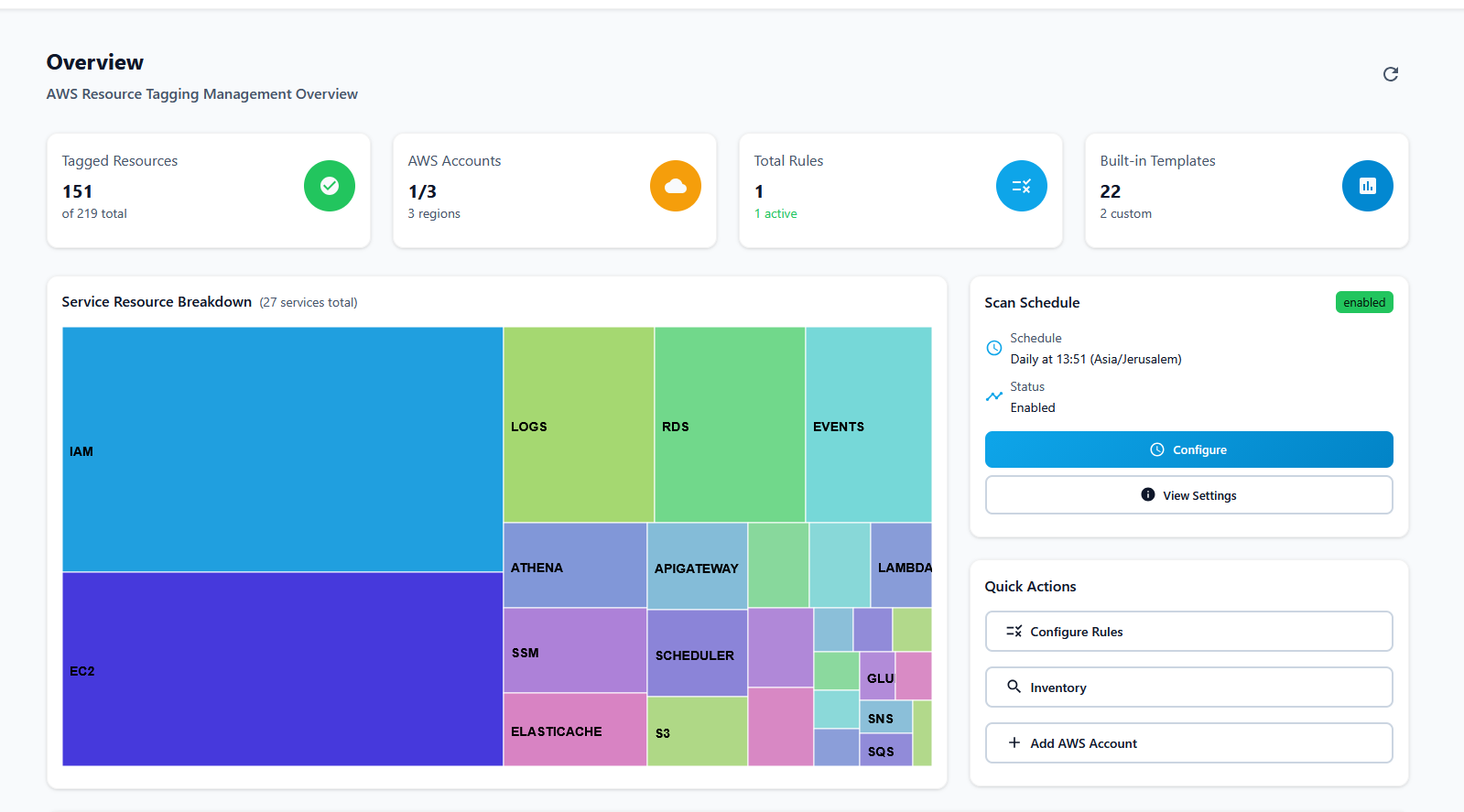
TagOps Dashboard showing automated tagging results

Strategic Value for Your Business

Transform your AWS infrastructure into a cost-efficient, secure, and operationally intelligent environment

Smart Cost Management

Automatically allocate AWS costs to departments, projects, and teams with intelligent tagging. Get accurate cost attribution and identify optimization opportunities.

  • Department cost allocation
  • Project-based billing
  • Cost optimization insights

Operational Intelligence

Enrich your resources with rich metadata and context. Help operations teams understand resource purpose, ownership, and relationships at a glance.

  • Resource context & purpose
  • Team ownership tracking
  • Operational metadata

Attribute-Based Access Control

Implement fine-grained security policies using resource tags. Control access based on environment, sensitivity, and business context for enhanced security.

  • Environment-based access
  • Data sensitivity controls
  • Business context security

Automated Tagging Rules

Create intelligent tagging rules with 22+ built-in templates. Automatically tag resources based on environment, cost center, owner, and more.

  • Professional rule wizard
  • Complex condition support
  • Built-in templates

Comprehensive Inventory

Get complete visibility into all your AWS resources across accounts and regions with advanced filtering and search capabilities.

  • Multi-account support
  • Advanced filtering
  • Export to CSV

Team Collaboration

Enable seamless collaboration with role-based access control. Let teams manage their own resources while maintaining security and governance.

  • ReadOnly & Administrator roles
  • Team-based permissions
  • Secure authentication

Solve Your Biggest AWS Tagging Problems

Stop fighting tag drift. Start automating compliance and cost allocation.

Problem

Finance still doesn't know who's costing what in AWS

Solution

TagOps auto-tags by department, project, team

Outcome

Accurate chargeback in minutes, not weeks. See exactly which teams are driving costs and optimize spend with confidence.

Problem

Resources get created without tags, breaking compliance

Solution

Automatic tagging on resource creation

Outcome

Every resource gets tagged instantly. Pass audits without manual work and enforce tag-based security policies automatically.

Problem

Operations teams waste hours finding resource owners

Solution

Auto-tag with owner, environment, purpose

Outcome

Know who owns what instantly. Reduce incident response time and eliminate "who owns this resource?" Slack threads.

Problem

Manual tagging is error-prone and time-consuming

Solution

22+ built-in templates, zero-code rules

Outcome

Reduce manual tagging by 95%. Set rules once, TagOps handles the rest—even for existing untagged resources.

Problem

Can't find untagged resources across accounts

Solution

Complete inventory across all accounts

Outcome

See every resource in one place. Filter by tags, export to CSV, and identify gaps instantly.

Problem

Tag drift happens when teams forget to tag

Solution

Daily scans catch and fix untagged resources

Outcome

Tag compliance stays at 95%+ automatically. No more surprise untagged resources during audits.

Get Started in 5 Minutes

Three simple steps to automated AWS tagging

1

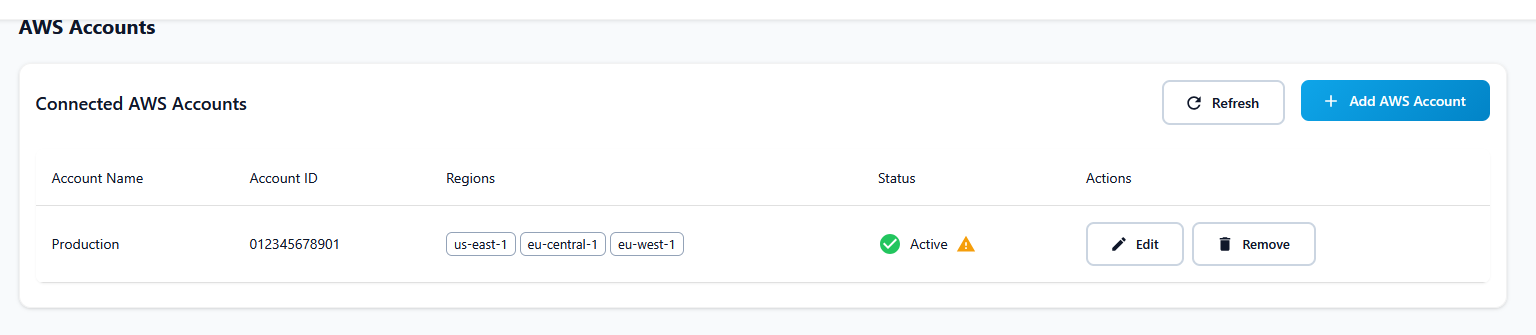
Connect AWS (2 minutes, no API keys)

Click "Add AWS Account" in TagOps, copy the CloudFormation link, and deploy it in your AWS account. No API keys needed—just IAM roles. TagOps connects securely in under 2 minutes.

TagOps AWS Account Onboarding - Connect your AWS account in 2 minutes
2

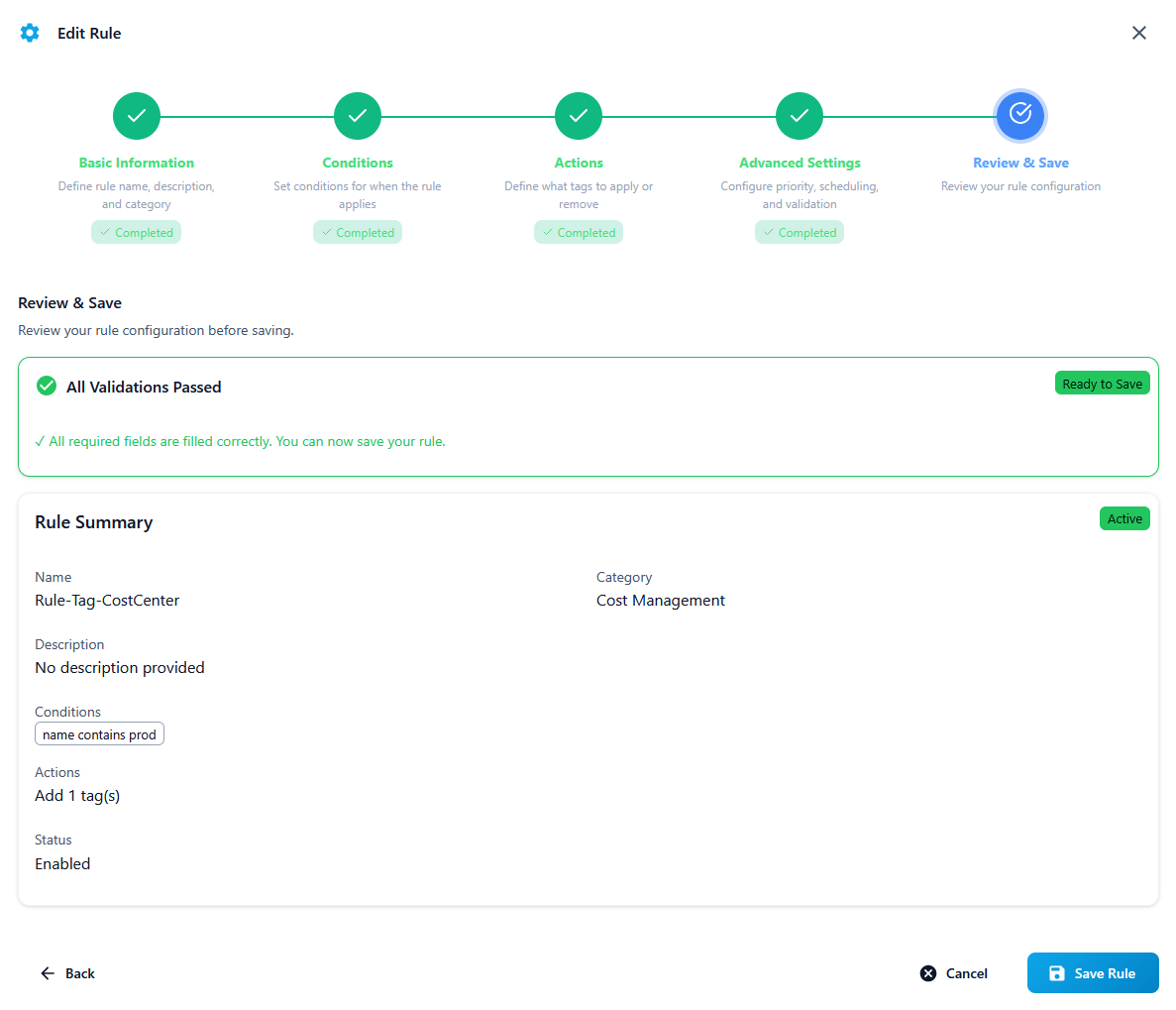
Create Rules (2 minutes)

Use our rule builder to create tagging rules. Start with a template like "Tag EC2 by Environment" or build custom rules. Example: "IF resource type = EC2 AND region = us-east-1 THEN add tags: CostCenter=Engineering, Owner=Platform Team"

TagOps Rule Builder - Create tagging rules with IF/THEN conditions
22+ Templates Available
3

See Results (Almost instant)

Watch resources get tagged automatically. View your dashboard to see tagged resources, active rules, and compliance metrics. TagOps starts tagging new resources immediately and scans existing resources daily.

TagOps Dashboard showing tagging results and compliance metrics

Simple, Transparent Pricing

Pay per AWS account - simple and scalable pricing that grows with your business

Cost Calculator

Adjust the slider to see pricing for different account quantities

Starter

$30/account
1-3 accounts

Growth

$25/account
4-9 accounts

Enterprise

$20/account
10+ accounts
× $30 = $30/month
Total $30/month
Starter

14-day free trial • No credit card required

Start with a Free Trial

Try TagOps for 14 days with full access to all features. No credit card required.

  • 1 AWS account
  • All tagging features
  • Full dashboard access
  • Email support

Frequently Asked Questions

Everything you need to know about TagOps

How long does it take to set up?

3 minutes to connect AWS + 2 minutes to create rules = 5 minutes total. Connect your AWS account using our CloudFormation template (no API keys needed). Then create your first tagging rule using our rule builder or templates. TagOps starts tagging immediately.

Do you support multi-cloud (Azure, GCP)?

AWS now, Azure and GCP coming in 2026. TagOps currently supports AWS with comprehensive coverage of 100+ AWS services. We're building Azure and GCP support and expect to launch in 2026. Join our waitlist to be notified when multi-cloud support is available.

How much does it cost?

Use our calculator above or try free for 14 days. Pricing starts at $20/month per AWS account. Use the interactive calculator in the Pricing section to see your exact cost. Or start a 14-day free trial—no credit card required—to see if TagOps fits your needs.

What if I already have some tags? Will TagOps overwrite them?

No But if you created a rule that matches an existing resource with the same tag key as the one in the rule - it will be overriden by the rule.

Can I try it before committing?

Yes—14-day free trial, no credit card required. Get full access to all features for 14 days. Connect one AWS account, create unlimited rules, and see results immediately. Cancel anytime during the trial with no charges.

Ready to Optimize Your AWS Costs, Operations & Security?

Start optimizing your AWS costs and security with TagOps. Get started with our free trial and see the difference intelligent resource tagging can make.

Book Demo

No credit card required • 14-day free trial • Cancel anytime

×