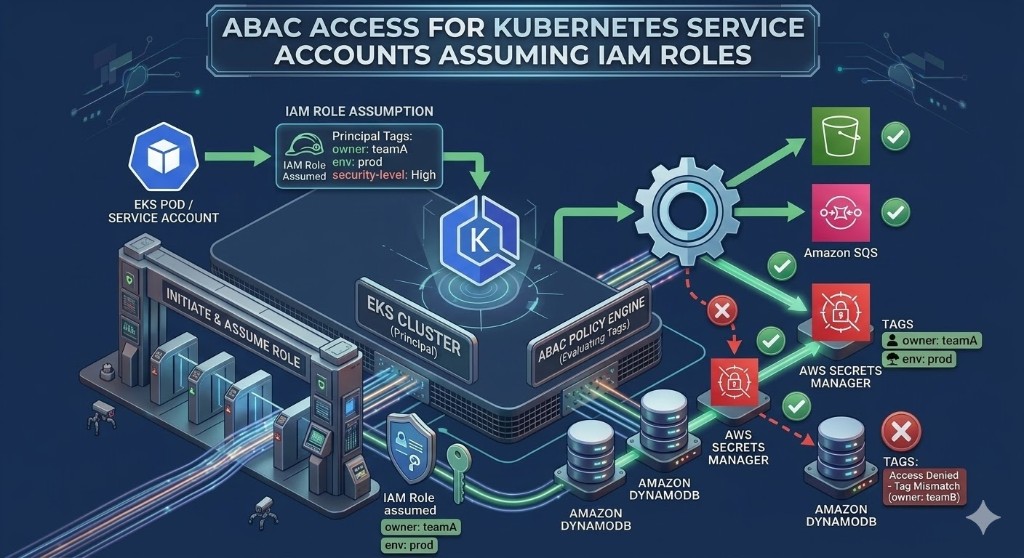
When EKS workloads access AWS services (S3, DynamoDB, Secrets Manager, SQS, etc.), many teams start with broad IAM permissions to "make it work." Over time, this becomes a major security risk: too much access, unclear boundaries, and hard-to-audit access paths.
Attribute-Based Access Control (ABAC) is one of the most scalable ways to fix this. In AWS ABAC, access decisions are made using attributes such as tags on principals and resources.
This post is a practical strategy guide for implementing ABAC with tags in EKS environments.
Why this matters (security-first view)
Without ABAC:
- IAM role count explodes as teams and environments grow
- policies become static and brittle
- cross-team access leaks happen silently
- least privilege becomes expensive to maintain
With ABAC:
- one policy pattern can apply to many workloads
- access scales with metadata, not with role sprawl
- governance teams can audit intent by reading tags
For multi-team EKS platforms, this is not "nice to have." It is foundational security architecture.
ABAC fundamentals for EKS
In EKS, workloads usually access AWS APIs through IAM Roles for Service Accounts (IRSA) or Pod identity. ABAC then evaluates:
- principal attributes (from IAM role/session tags)
- resource tags (tags on S3 buckets, DynamoDB tables, secrets, etc.)
- optional request attributes (
aws:RequestTag/...)
The most common ABAC pattern: allow access only when a principal tag matches a resource tag (for example service=checkout-api).
A practical tag schema for ABAC
Keep the schema small and stable:
owner– owning teamservice– workload identityenvironment– dev/staging/proddata-classification– internal/confidential/restricted
Optional:
tenant-idcompliance-scope
ABAC strategy: phased rollout
Phase 1: Standardize resource tags
Before ABAC enforcement, resources must be consistently tagged:
- S3 buckets
- DynamoDB tables
- Secrets Manager secrets
If resource tags are inconsistent, ABAC will create accidental denies or over-permissive exceptions.
Phase 2: Standardize workload identity attributes
Each EKS workload role should carry stable identity attributes (direct IAM tags and/or role naming conventions that map to session tags where applicable).
Minimum principal attributes:
serviceenvironmentowner
Phase 3: Apply ABAC allow rules
Start with read-only flows, then expand.
Pattern example:
- allow access only when principal
serviceequals resourceservice - allow access only when principal
environmentequals resourceenvironment
Phase 4: Add explicit deny guardrails
ABAC should include deny logic for sensitive boundaries:
- deny cross-environment writes (
devprincipal toprodresource) - deny access to
data-classification=restrictedunless principal has matching clearance attribute
Phase 5: Audit and tune
Track denied requests and false positives. Update tag quality and policy logic iteratively.
Policy pattern examples
These are strategy examples (adjust to your environment and testing process).
Example 1: S3 access by matching service and environment
{
  "Version": "2012-10-17",
  "Statement": [
    {
      "Sid": "AllowServiceScopedS3Access",
      "Effect": "Allow",
      "Action": ["s3:GetObject", "s3:PutObject", "s3:ListBucket"],
      "Resource": [
        "arn:aws:s3:::*",
        "arn:aws:s3:::*/*"
      ],
      "Condition": {
        "StringEquals": {
          "aws:ResourceTag/service": "${aws:PrincipalTag/service}",
          "aws:ResourceTag/environment": "${aws:PrincipalTag/environment}"
        }
      }
    }
  ]
}
Example 2: Explicit deny for restricted data classification
{
  "Version": "2012-10-17",
  "Statement": [
    {
      "Sid": "DenyRestrictedDataWithoutClearance",
      "Effect": "Deny",
      "Action": "*",
      "Resource": "*",
      "Condition": {
        "StringEquals": {
          "aws:ResourceTag/data-classification": "restricted"
        },
        "StringNotEquals": {
          "aws:PrincipalTag/data-classification": "restricted"
        }
      }
    }
  ]
}Real-world security scenarios
Scenario 1: Secrets isolation between microservices
Problem
orders-api and payments-api both run in prod. A single broad policy lets either service read any secret.
ABAC solution
- tag secrets with
serviceandenvironment - principal role for each service has matching principal tags
- allow only when both values match
Result
If orders-api is compromised, attacker cannot read payments-api secrets by default.
Scenario 2: Cross-environment data tampering risk
Problem
A dev workload role can write to prod DynamoDB due to legacy wildcard policy.
ABAC solution
- tag tables with
environment - principal roles tagged by environment
- deny any write where environment mismatch is detected
Result
Environment boundary is enforced by metadata, not only by naming convention.
Scenario 3: Multi-tenant service boundary
Problem
Shared EKS cluster processes requests for multiple tenants; workload access could cross tenant resources.
ABAC solution
- add
tenant-idtags to both principal context and resources - allow only matching tenant tags
Result
Tenant isolation is policy-enforced even in shared infrastructure models.
Common ABAC pitfalls in EKS
Pitfall 1: Tag inconsistency
If resources are missing tags, ABAC outcomes become unpredictable.
Fix: enforce mandatory tags at creation and run continuous drift detection.
Pitfall 2: Overusing ABAC keys
Too many keys make policy logic fragile.
Fix: use 3–5 stable keys for enforcement; keep the rest for reporting.
Pitfall 3: No explicit deny model
Allow-only policies often leave edge-case leakage paths.
Fix: add high-confidence deny rules for environment and classification boundaries.
Pitfall 4: No observability
Teams cannot tune ABAC if deny events are not visible.
Fix: monitor CloudTrail and IAM denied events; review trends weekly.
How TagOps strengthens ABAC operations
ABAC depends on tag quality. If tags drift, security posture drifts. TagOps helps by improving metadata reliability:
- consistent tag rule application across accounts/services
- continuous detection of missing/incorrect tags
- automated correction where deterministic
- improved confidence that ABAC decisions reflect intended governance
Think of it this way:
- IAM policies define the security intent
- TagOps helps keep the metadata truth accurate
Both are required for ABAC to stay secure at scale.
ABAC implementation checklist (production-ready)
- Define ABAC tag schema and owners
- Tag all target resources consistently
- Standardize EKS workload role attributes
- Deploy read-scope ABAC policies first
- Add explicit deny controls for high-risk boundaries
- Validate in staging with synthetic access tests
- Enable drift detection/remediation for ABAC-critical tags
- Track denied events and adjust policy precision
Hands-on example: Secrets Manager ABAC with EKS Pod Identity
This example shows a complete, testable flow:
- Create two Secrets Manager secrets with different tags
- Create an IAM role (with principal tags) that can access only one secret via ABAC
- Create Pod Identity association
- Run a simple pod that uses AWS CLI and the bound service account
Prerequisites
- EKS cluster with Pod Identity Agent add-on installed
kubectlcontext configured to your cluster- AWS CLI credentials with IAM/EKS/Secrets Manager permissions
Set variables:
export AWS_REGION="eu-west-1"
export ACCOUNT_ID="$(aws sts get-caller-identity --query Account --output text)"
export CLUSTER_NAME="eks-lab1"
export NAMESPACE="default"
export SERVICE_ACCOUNT="abac-secrets-reader"
export ROLE_NAME="eks-podid-abac-secrets-owner-team-a-prod"
export POLICY_NAME="eks-podid-abac-secrets-owner-team-a-prod-policy"
Create Two Secrets With Tags
aws secretsmanager create-secret \
  --region "$AWS_REGION" \
  --name "blog/abac/app1/db-url" \
  --secret-string "postgres://app1-user:pass@db.internal/app1" \
  --tags Key=owner,Value=team-a Key=environment,Value=prod

aws secretsmanager create-secret \
  --region "$AWS_REGION" \
  --name "blog/abac/app2/db-url" \
  --secret-string "postgres://app2-user:pass@db.internal/app2" \
  --tags Key=owner,Value=team-b Key=environment,Value=prod
Create IAM Role + ABAC Policy (Role Can Access Only Owner/Team-a + Prod Secrets)
Create trust policy for EKS Pod Identity:
                        {
                        "Version": "2012-10-17",
                        "Statement": [
                            {
                            "Effect": "Allow",
                            "Principal": {
                                "Service": "pods.eks.amazonaws.com"
                            },
                            "Action": [
                                "sts:AssumeRole",
                                "sts:TagSession"
                            ]
                            }
                        ]
                        }
Create role with principal tags owner=team-a and environment=prod:
aws iam create-role \
  --role-name "$ROLE_NAME" \
  --assume-role-policy-document file://trust-policy.json \
  --tags Key=owner,Value=team-a Key=environment,Value=prod
Create ABAC permissions policy:
{
  "Version": "2012-10-17",
  "Statement": [
    {
      "Sid": "AllowReadWhenOwnerAndEnvironmentMatch",
      "Effect": "Allow",
      "Action": [
        "secretsmanager:GetSecretValue",
        "secretsmanager:DescribeSecret"
      ],
      "Resource": "*",
      "Condition": {
        "StringEquals": {
          "aws:ResourceTag/owner": "\${aws:PrincipalTag/owner}",
          "aws:ResourceTag/environment": "\${aws:PrincipalTag/environment}"
        }
      }
    }
  ]
}
Create and attach policy:
aws iam create-policy \
  --policy-name "$POLICY_NAME" \
  --policy-document file://abac-secrets-policy.json

aws iam attach-role-policy \
  --role-name "$ROLE_NAME" \
  --policy-arn "arn:aws:iam::${ACCOUNT_ID}:policy/${POLICY_NAME}"
Create Pod Identity Association
Create service account:
kubectl create serviceaccount "$SERVICE_ACCOUNT" -n "$NAMESPACE"Associate service account with IAM role:
aws eks create-pod-identity-association \
  --cluster-name "$CLUSTER_NAME" \
  --namespace "$NAMESPACE" \
  --service-account "$SERVICE_ACCOUNT" \
  --role-arn "arn:aws:iam::${ACCOUNT_ID}:role/${ROLE_NAME}"
Run a Simple Kubernetes Pod (AWS CLI Image + Service Account)
This pod attempts to read both secrets. Expected result:
blog/abac/app1/db-url→ successblog/abac/app2/db-url→ access denied
apiVersion: v1
kind: Pod
metadata:
  name: abac-secrets-test
  namespace: default
spec:
  serviceAccountName: abac-secrets-reader
  restartPolicy: Never
  containers:
    - name: aws-cli
      image: public.ecr.aws/aws-cli/aws-cli:2.17.35
      env:
        - name: AWS_REGION
          value: "eu-west-1"
      command: ["/bin/sh","-c"]
      args:
        - |
          set -e
          echo "Trying app1 secret (should succeed)"
          aws secretsmanager get-secret-value --region ${AWS_REGION} --secret-id blog/abac/app1/db-url --query SecretString --output text || true
          echo "Trying app2 secret (should fail)"
          aws secretsmanager get-secret-value --region ${AWS_REGION} --secret-id blog/abac/app2/db-url --query SecretString --output text || true
          echo "Sleeping for 300 seconds to allow log inspection"
          sleep 300
Apply and verify:
kubectl apply -f abac-secrets-test.yaml
kubectl logs pod/abac-secrets-test -n "$NAMESPACE"
What this proves
- ABAC is enforced from principal tags (
owner,environment) to resource tags (owner,environment) - The same IAM policy can be reused for many workloads by changing only role tags and resource tags
- Pod Identity provides least-privilege access without hardcoding credentials in pods
Final takeaway
ABAC with tags is one of the most powerful security patterns for EKS-integrated AWS services, but it only works when metadata quality is continuously governed.
If you treat tags as security primitives, not just reporting fields, you can achieve scalable least privilege without role explosion and with much clearer auditability.
Ready to scale ABAC with clean metadata?
Use TagOps to keep resource tags accurate and continuously compliant so ABAC policies remain trustworthy at scale.
Get TagOps on AWS Marketplace