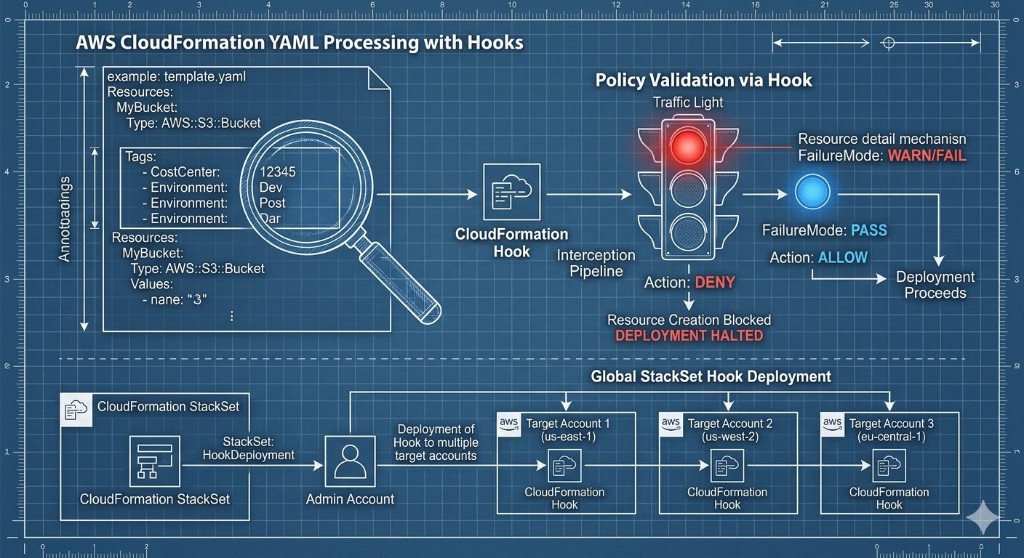
This is part 2 of the IaC tagging governance series, focused specifically on CloudFormation.
If you have not read part 1 yet, start there first for the full context (especially on why tagging governance usually fails in the real world): AWS Tagging Governance with IaC: Terraform (Part 1).
CloudFormation is a reliable way to standardize AWS resource creation, including tags. But like Terraform, CloudFormation alone is not a full governance system for dynamic, multi-account cloud environments.
In this guide we will:
- Make CloudFormation tagging options concrete with short, real examples.
- Show how to add linting and policy-as-code checks before anything hits the AWS API.
- Walk through CloudFormation hooks and StackSets for organization-wide enforcement.
- Call out where CloudFormation stops—and where continuous tools like TagOps need to take over.
If you are a platform engineer, FinOps lead, or cloud architect trying to make “every resource is tagged correctly” actually true, this article is written for you.
Core CloudFormation Tagging Options
In the AWS CloudFormation ecosystem, resource tagging is typically managed by defining a Tags array within individual resource properties, or by
passing stack-level tags via the --tags flag in the AWS CLI, which then automatically cascades to supported resources within that stack.
| Tagging layer | Applied where | Best for |
|---|---|---|
| Stack-level tags | CloudFormation stack object (and inheriting resources) | Global governance keys like owner, environment, cost-center |
Resource-level Tags |
Individual resources in the template | Precise control, exceptions, and resources that do not inherit stack tags reliably |
1) Stack-Level Tags
Pass tags at stack deploy/update time:
aws cloudformation deploy \
  --template-file app.yaml \
  --stack-name app-prod \
  --tags owner=platform environment=prod cost-center=cc-101
This is central and simple, and it is often the fastest way to enforce baseline metadata across a stack.
What to know in practice:
- Stack-level tags are great for global governance keys like
owner,environment, andcost-center. - Propagation is resource-type dependent. Some resources inherit stack tags cleanly, some partially, and some not at all.
- Service-created or later-created child resources may still miss these tags unless explicitly configured.
- Updating stack tags later does not always retroactively fix every downstream child artifact.
Recommended usage:
- Treat stack tags as your baseline contract.
- Keep baseline keys small and mandatory.
- Still validate tag coverage after deploy (inventory/report or automated checks), especially for managed-service children.
2) Resource-Level Tags
Define tags explicitly in each resource:
Resources:
  AppBucket:
    Type: AWS::S3::Bucket
    Properties:
      Tags:
        - Key: owner
          Value: platform
        - Key: environment
          Value: prod
        - Key: cost-center
          Value: cc-101
Resource-level tags are the most deterministic CloudFormation tagging method because they are part of the template itself.
Why teams rely on this:
- You control exactly which resource gets which tags.
- Tag intent is versioned in Git and visible in code review.
- It reduces ambiguity when stack-level propagation is inconsistent.
Trade-offs:
- It becomes verbose in large templates.
- Teams can drift if every stack defines tag keys ad hoc.
- Missing
Tagsblocks are easy to overlook without CI validation.
Recommended pattern:
- Define a shared tag contract (same keys, naming, value format).
- Use parameters/mappings/macros to reduce repetition.
- Add CI policies (
cfn-lint/cfn-guard/hooks) to fail templates missing required tag keys.
Practical tip
Keep stack-level tags small and mandatory, and push all workload-specific or team-specific tags into resource-level Tags so reviews stay readable.
Linting and Pre-Deployment Validation
Before templates ever reach the AWS API, platform teams often use cfn-lint to enforce tagging standards locally or in CI/CD pipelines. Because
CloudFormation does not natively validate the presence of specific tags during syntax checks, platform engineers write custom Python rules for
cfn-lint to ensure templates include required keys (like Environment or Owner) before the code is merged.
Additionally, AWS CloudFormation Guard allows teams to define policy-as-code rules (for example, checking that AWS::AutoScaling::AutoScalingGroup
sets its TagProperty to PropagateAtLaunch) to validate templates locally.
Teams typically combine:
cfn-lintcustom rulescfn-guardpolicy checks
cfn-lint vs cfn-guard for Tag Validation
Both tools are useful, but they solve different layers:
cfn-lint: template correctness plus optional custom lint logiccfn-guard: policy-as-code enforcement for governance rules
| Aspect | cfn-lint |
cfn-guard |
|---|---|---|
| Primary goal | Template quality and basic correctness | Expressive governance and compliance rules |
| Authoring model | Python rules extending the linter | Domain-specific policy language |
| Where it runs | Locally and in CI as part of lint step | Locally, in CI, or integrated into pipelines |
| Great for | “Did the engineer forget a Tags block?” |
“Does this tag value follow our allowed list and org rules?” |
If you want strict organizational checks (like required environment tag values), cfn-guard is usually the primary enforcement tool.
For both examples we use the following template:
AWSTemplateFormatVersion: 2010-09-09
Resources:
  AppBucket:
    Type: AWS::S3::Bucket
    Properties:
      Tags:
      - Key: owner
        Value: platform
      - Key: environment
        Value: test
      - Key: cost-center
        Value: cc-101
A) Validate environment Tag with cfn-lint
For policy-style checks, you typically add a custom cfn-lint rule (for example, rule id E9001) that inspects each target resource and
verifies:
Tagsexistsenvironmentkey exists- value is one of
dev,staging,prod
Example E9001_require_environment_tag.py content:
from cfnlint.rules import CloudFormationLintRule, RuleMatch


class RequireEnvironmentTag(CloudFormationLintRule):
    id = "E9001"
    shortdesc = "Require environment tag"
    description = (
        "Requires an `environment` tag on selected resources, "
        "with value in {dev, staging, prod}"
    )
    source_url = "https://github.com/aws-cloudformation/cfn-lint"
    tags = ["resources", "tags", "governance"]

    allowed_values = {"dev", "staging", "prod"}
    governed_types = {
        "AWS::EC2::Instance",
        "AWS::S3::Bucket",
        "AWS::RDS::DBInstance",
    }

    def match(self, cfn):
        matches = []
        resources = cfn.template.get("Resources", {})

        for logical_id, resource in resources.items():
            resource_type = resource.get("Type")
            if resource_type not in self.governed_types:
                continue

            properties = resource.get("Properties", {})
            tags = properties.get("Tags")
            tags_path = ["Resources", logical_id, "Properties", "Tags"]

            if not isinstance(tags, list):
                matches.append(
                    RuleMatch(
                        tags_path,
                        f"{logical_id} ({resource_type}) must define a Tags list "
                        "with environment tag",
                    )
                )
                continue

            environment_found = False
            for index, tag in enumerate(tags):
                if not isinstance(tag, dict):
                    continue

                if tag.get("Key") == "environment":
                    environment_found = True
                    value = tag.get("Value")
                    value_path = tags_path + [index, "Value"]

                    # Keep this strict/simple example to literal string values only.
                    if not isinstance(value, str):
                        matches.append(
                            RuleMatch(
                                value_path,
                                "environment tag value must be a literal string "
                                "(dev|staging|prod)",
                            )
                        )
                    elif value not in self.allowed_values:
                        matches.append(
                            RuleMatch(
                                value_path,
                                f"environment must be one of "
                                f"{sorted(self.allowed_values)}",
                            )
                        )
                    break

            if not environment_found:
                matches.append(
                    RuleMatch(
                        tags_path,
                        f"{logical_id} ({resource_type}) is missing required "
                        "`environment` tag",
                    )
                )

        return matches
How to run validation:
cfn-lint -t template.yaml --append-rules ./cfnlint-rulesExample output:
E9001 environment must be one of ['dev', 'prod', 'staging']
template.yaml:10:9
How to exclude a specific resource from validation:
Resources:
  LegacyBucket:
    Type: AWS::S3::Bucket
    Metadata:
      cfn-lint:
        config:
          ignore_checks:
            - E9001
B) Validate environment Tag with cfn-guard
cfn-guard is more direct for governance policies. You define rules once and evaluate templates in CI.
Example guard rules (guard/env-tags.guard):
let governed_resources = Resources.*[
  Type IN ["AWS::EC2::Instance", "AWS::S3::Bucket", "AWS::RDS::DBInstance"]
]

rule env_tag_required when %governed_resources !empty {
  %governed_resources.Properties.Tags[Key == "environment"] !empty
  %governed_resources.Properties.Tags[Key == "environment"] {
    Value IN ["dev", "staging", "prod"]
  }
}
How to run validation:
cfn-guard validate -r guard/env-tags.guard -d template.yamlExample output:
FAILED rules
env-tags.guard/env_tag_required    FAIL
---
Evaluating data template.yaml against rules env-tags.guard
Number of non-compliant resources 1
Resource = AppBucket {
  Type      = AWS::S3::Bucket
  Rule = env_tag_required {
    ALL {
      Check =  Value IN  ["dev","staging","prod"] {
        ComparisonError {
          Error            = Check was not compliant as property [/Resources/AppBucket/Properties/Tags/1/Value] was not present in [(resolved, Path=[] Value=["dev","staging","prod"])]
        }
          PropertyPath    = /Resources/AppBucket/Properties/Tags/1/Value
          Operator        = IN
          Value           = "test"
          ComparedWith    = [["dev","staging","prod"]]
      }
    }
  }
}
How to exclude a specific resource from validation?
A practical pattern is to add an explicit metadata exemption flag and filter it in rule selection.
Template example:
Resources:
  LegacyBucket:
    Type: AWS::S3::Bucket
    Metadata:
      TagPolicy:
        ExcludeEnvValidation: true
Guard query pattern (conceptually):
let governed_resources = Resources.*[
  Type IN ["AWS::EC2::Instance", "AWS::S3::Bucket", "AWS::RDS::DBInstance"]
  AND Metadata.TagPolicy.ExcludeEnvValidation != true
]
This gives you a clear, auditable exception mechanism instead of disabling the entire rule set.
AWS CloudFormation Hooks for Tag Policies
To enforce compliance at the API level, AWS relies on CloudFormation Hooks. Instead of relying only on pre-merge checks, you can intercept stack operations right
as CloudFormation attempts to create or update resources. Organizations can activate the AWS-managed
AWS::TagPolicies::TaggingComplianceValidator hook. This hook intercepts the stack provisioning operation and proactively inspects the
configuration against your organization's required tags.
Implementing this hook requires establishing a dedicated execution role with a trust policy allowing hooks.cloudformation.amazonaws.com to assume
the role, and granting the tag:ListRequiredTags permission.
Once configured, platform leads can set the hook's FailureMode to one of two states:
- Warn mode (
"FailureMode": "WARN"): emits a warning but allows the stack deployment to proceed. -
Fail mode (
"FailureMode": "FAIL"): blocks the stack operation entirely if the template lacks the required tags, preventing non-compliant infrastructure from ever being provisioned.
Example:
- Activate the AWS-managed TaggingComplianceValidator CloudFormation Hook. Follow the AWS documentation to enforce required tag policies using CloudFormation hooks: Enforcing Required Tag Keys with CloudFormation .
Example core steps:
- Create an execution role with trust relationships for CloudFormation hooks and permissions to call
tag:ListRequiredTags. - Activate the
AWS::TagPolicies::TaggingComplianceValidatorhook in your account via template or console, associating it with your execution role. - Configure the hook to target your stacks and set the desired
FailureMode(WARN/FAIL).
Refer to the AWS documentation above for full YAML templates and step-by-step instructions.
Create Tag Policy on organization layer
{
  "tags": {
    "CostCenter": {
      "report_required_tag_for": {
        "@@assign": [
          "ec2:vpc"
        ]
      },
      "tag_key": {
        "@@assign": "CostCenter"
      },
      "tag_value": {
        "@@assign": [
          "100",
          "200",
          "300*"
        ]
      }
    }
  }
}
In this example, acceptable values for the CostCenter tag key are 100, 200, and 300* and the tag is applied
to ec2:vpc resources.
Provision CloudFormation Stack
AWSTemplateFormatVersion: 2010-09-09
Resources:
  myVPC:
    Type: AWS::EC2::VPC
    Properties:
      CidrBlock: 10.0.0.0/16
      EnableDnsSupport: 'true'
      EnableDnsHostnames: 'true'
      Tags:
      - Key: owner
        Value: platform
      - Key: environment
        Value: test
      - Key: cost-center
        Value: cc-101
Output
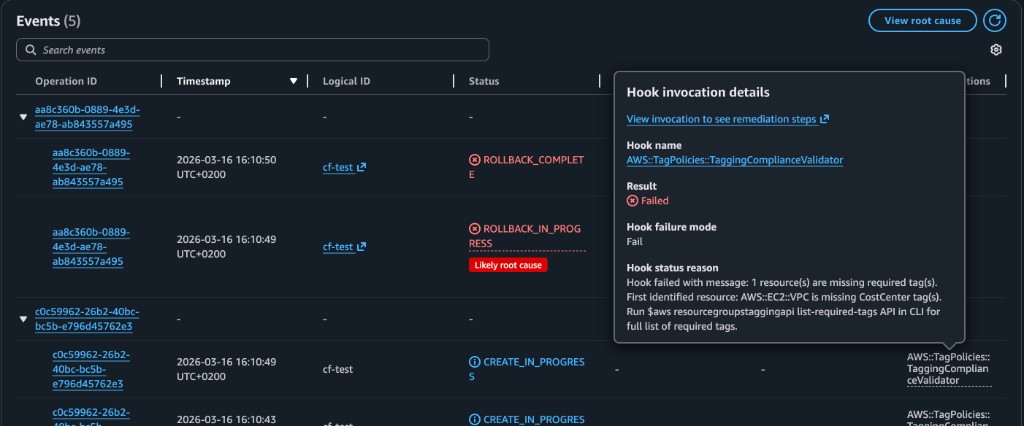
In the example above you can see a failed CloudFormation provisioning event due to noncompliant tagging. The "Hook invocation details" pop-up shows that the
AWS::TagPolicies::TaggingComplianceValidator hook was invoked, the result was Failed, and the detailed error message-
"Resource(s) of type 'AWS::EC2::VPC' are missing required tags. Required tags: [CostCenter]"-indicates that the resource did not meet the organizational tag
policy, causing the stack deployment to fail.
This enforcement mechanism gives immediate and visible feedback in the CloudFormation Events pane, helping teams maintain compliance at deployment time.
CloudFormation StackSet
To achieve enterprise-wide governance, platform teams heavily utilize CloudFormation StackSets. StackSets allow administrators to deploy the hook activation template across all organizational units, accounts, and AWS Regions simultaneously, ensuring a uniform tagging compliance baseline without manual configuration in each account.
A typical pattern we see in mature organizations:
- Define required tag keys and allowed values at the AWS Organizations level via Tag Policies.
- Activate the
AWS::TagPolicies::TaggingComplianceValidatorhook in a “governance” account. - Roll the hook activation stack out to all target accounts/Regions using StackSets.
- Monitor non-compliant events and iterate on the policy rather than chasing untagged resources manually.
Common CloudFormation Governance Gaps
1) Service-Created Children
A tagged parent stack/resource does not guarantee complete child-resource tagging coverage.
- Many AWS services create secondary resources (snapshots, ENIs, log groups, etc.) that may not inherit your tags.
- Even when inheritance is supported, configuration flags (for example,
PropagateAtLaunch) are easy to miss. - Tag drift here usually shows up months later in cost reports and access reviews.
2) Out-of-Band Operations
Resources created outside CloudFormation flows are invisible to template-time checks.
- Console experiments, one-off CLI scripts, or ad‑hoc automation bypass your carefully designed templates.
- cfn-lint, cfn-guard, and hooks never see these resources, so they cannot enforce anything.
- Platform teams typically discover this when large, untagged spend appears in a new account or Region.
3) Inconsistent Multi-Stack Standards
Without a strict shared contract, teams can drift in key naming and value vocabularies.
- One team uses
env, another usesenvironment, a third usesstage. - Billing and security tools then have to normalize or guess intent, which leads to blind spots.
- Central policies (like Tag Policies and hooks) cannot enforce well if the underlying keys are inconsistent.
Reality check
Even with perfect CloudFormation templates, you will still see untagged or wrongly tagged resources unless you monitor for drift and fix it continuously.
Final Takeaway
CloudFormation gives strong deployment-time control: you can define tags in templates, validate them with linting and policy tools, and even block non-compliant stacks with hooks. The biggest governance gaps appear after deployment (service-created children, manual changes) and outside the CloudFormation path entirely.
A complete tagging model layers CloudFormation with continuous detection and remediation—where a platform like TagOps continuously scans accounts and Regions, finds drift, and repairs tags to match your policies.
Need CloudFormation tagging that stays compliant after deploy?
Use TagOps to combine template-time controls with continuous runtime governance, so your tag policies stay true in production—not just in templates.
Get TagOps on AWS Marketplace