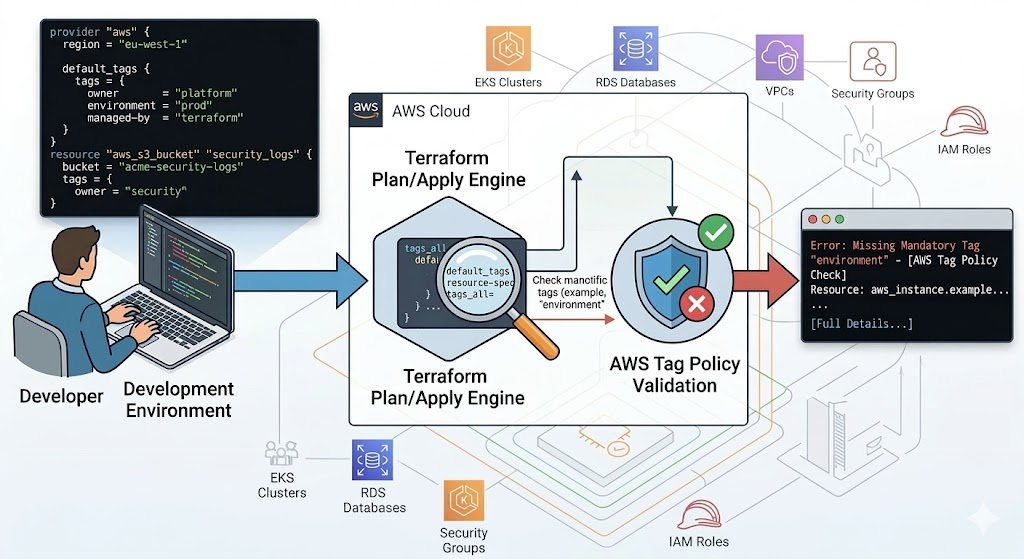
In modern cloud environments, resource tagging is not an organizational convenience. It is the foundation of automated governance.
Tags drive cost allocation and chargeback, security boundaries through ABAC, and operational ownership and lifecycle automation. Without a strict tagging strategy, platform teams face orphaned resources, untraceable billing, and avoidable security blind spots.
To improve consistency, teams enforce tags in Infrastructure as Code (IaC), primarily Terraform and CloudFormation. This helps a lot, but Terraform alone still leaves governance gaps in dynamic environments. In this two-part deep dive, we split our analysis into Terraform and CloudFormation to understand their respective tagging mechanisms, expose the critical governance disadvantages of these native approaches-including configuration drift, strict AWS quota limitations, and out-of-band resource creation loopholes-and show how integrating TagOps bridges the tagging governance gap in real time.
This part focuses on Terraform: what works, what breaks, and how to make it production-ready.
| Capability | What Terraform helps with | Where gaps still appear |
|---|---|---|
| Resource & module tags | Deterministic tags defined in code and reviewed in PRs | Service-created children and out-of-band resources |
default_tags |
Baseline tags applied automatically to many resources | Resources that do not honor provider defaults (for example some ASG children) |
| Tag Policies integration | Plan/apply-time validation against org policies | Runtime drift and resources changed after apply |
What Terraform Gives You Out of the Box
Terraform is an IaC tool that lets teams define and manage cloud resources declaratively. For tagging governance, it provides strong baseline controls:
- resource-level tags
- module-level tag contracts
- provider-level defaults with
default_tags - validation and enforcing required tags with Tag Policies
For many teams, this removes most manual tagging mistakes for newly provisioned resources.
Resource-Level and Module-Level Tagging
Terraform supports two practical tagging layers:
- Resource-level tags for direct resources declared in your code
- Module-level tags for resources created inside reusable modules
Terraform lets you set tags within each resource block, so all directly declared resources get consistent metadata. In addition, nearly all major Terraform
modules let you pass a tags map to apply standard tags to every resource the module creates, cascading your tag standards automatically across
module-managed infrastructure. This is important because many teams use modules for most infrastructure; if your governance keys are only added to direct
resources, module-managed resources can drift from your standard.
Resource-Level Tagging Example
resource "aws_vpc" "main" {
  cidr_block = "10.0.0.0/16"
  tags = {
    Name        = "vpc-main"
    owner       = "platform"
    environment = "dev"
    managed-by  = "terraform"
  }
}
Module-Level Tagging Example
module "vpc" {
  source = "terraform-aws-modules/vpc/aws"

  name = "my-vpc"
  cidr = "10.0.0.0/16"
  azs  = ["eu-west-1a", "eu-west-1b", "eu-west-1c"]

  private_subnets = ["10.0.1.0/24", "10.0.2.0/24", "10.0.3.0/24"]
  public_subnets  = ["10.0.101.0/24", "10.0.102.0/24", "10.0.103.0/24"]

  tags = {
    owner       = "platform"
    environment = "dev"
    managed-by  = "terraform"
    cost-center = "cc-1024"
  }
}
Best practice
Define required governance keys once (for example in locals.common_tags) and pass the same map into all modules, instead of repeating ad hoc tag maps per module.
Design tip
Keep module inputs simple: pass one or two tag maps (for example common_tags and extra_tags) instead of many individual tag variables.
The Power of default_tags and tags_all
The most efficient way to cascade tags across a Terraform deployment is by using the default_tags block defined directly at the AWS provider level.
Every AWS resource managed by that specific provider automatically inherits this baseline set of tags, eliminating the tedious, error-prone task of appending
tags to individual resource blocks.
When resource-level tags are also present, Terraform merges them with the default tags to compute a tags_all attribute. If a tag key overlaps
between the provider and the resource, the resource-specific tag automatically takes precedence.
Example Baseline
provider "aws" {
  region = "eu-west-1"

  default_tags {
    tags = {
      owner       = "platform"
      environment = "prod"
      managed-by  = "terraform"
    }
  }
}
Example Resource-Level Override
resource "aws_s3_bucket" "security_logs" {
  bucket = "acme-security-logs"
  tags = {
    owner = "security"
  }
}
However, Terraform's native tagging has blind spots. A notable example is AWS Auto Scaling Groups (ASGs). Because AWS ASGs dynamically provision and terminate
underlying EC2 instances based on demand, Terraform does not directly manage or track those specific instances in its state file. Consequently, ASG instances do
not automatically inherit provider-level default_tags. Engineers must explicitly configure a data source to pull the provider's default tags and
use dynamic for_each blocks to forcefully inject them into the ASG's configuration.
Common pitfall
Assuming default_tags automatically reach every child resource often leads to untagged EC2 instances in Auto Scaling Groups and surprise spend.
Enforcing Required Tags Before Apply
To prevent developers from pushing untagged infrastructure, teams traditionally rely on strict variable validation. By defining regex patterns within variable
blocks, Terraform plans fail fast if a required tag format (like cost_center) is missing or invalid.
Recently, the Terraform AWS Provider (version 6.22.0 and above) introduced direct integration with AWS Organizations Tag Policies. By setting the
tag_policy_compliance argument to "error" or "warning", the provider proactively evaluates your deployment against the
organization's effective tag policy during the plan and apply phases. This integration evaluates resources before creation or when modifying tags on an existing
resource.
Tag Policy Example
1. Create Tag Policy on the organization layer
{
  "tags": {
    "CostCenter": {
      "report_required_tag_for": {
        "@@assign": [
          "ec2:vpc"
        ]
      },
      "tag_key": {
        "@@assign": "CostCenter"
      },
      "tag_value": {
        "@@assign": [
          "100",
          "200",
          "300*"
        ]
      }
    }
  }
}
In this example, acceptable values for the CostCenter tag key are 100, 200, and 300*, and the tag is
applied to the ec2:vpc resource type.
2. Attach the policy to the relevant Root/OU/Account
3. Run Terraform code
provider "aws" {
  tag_policy_compliance = "error"
}

resource "aws_vpc" "main" {
  cidr_block = "10.0.0.0/16"
  tags = {
    Name = "vpc-main"
  }
}
4. Example output
Planning failed. Terraform encountered an error while generating this plan.

╷
│ Error: Missing Required Tags - An organizational tag policy requires the following tags for aws_vpc: [CostCenter]
│
│   with aws_vpc.main,
│   on main.tf line 5, in resource "aws_vpc" "main":
│    5: resource "aws_vpc" "main" {
│
╵
While this is a powerful guardrail, there are technical limitations:
- Permissions: the calling principal executing Terraform must have the
tag:ListRequiredTagsIAM permission. - Validation exclusions: non-tag updates to existing resources are always permitted, even if the resource's current tags violate the policy.
-
SDK limitations: due to limitations in the Terraform Plugin SDK v2 (which powers a vast majority of AWS provider resources), resources using
this older SDK cannot emit true warning diagnostics for tag policy violations; instead, they log violations silently at a WARN level.
See the Terraform AWS provider documentation for details.
Important caveat
Tag Policies and provider checks are useful, but they do not replace runtime governance.
Known Terraform Blind Spots
1) Child-Resource Propagation Gaps
Parent resources can be tagged, while service-created children are only partially covered. Typical examples include:
- Auto Scaling lifecycle resources
- ECS tasks
- snapshots and restore artifacts
2) Out-of-Band Creation
Resources created outside Terraform (console/API/manual scripts) bypass plan-time controls. A common example is resources created by Kubernetes controllers.
3) Post deploy drift
If external automation modifies tags after apply, Terraform may try to revert those changes only on the next run-unless governance design is aligned.
4) Overuse of ignore_changes
Using ignore_changes can suppress noisy plans, but overuse hides real policy regressions and weakens state fidelity.
Final Takeaway
Terraform remains one of the best tools for deterministic infrastructure delivery and baseline tagging discipline. Governance problems usually appear after deployment, when resources continue changing through service behavior and manual paths.
Tagging governance is a lifecycle problem, not only a deployment problem. The scalable model is Terraform for baseline control plus continuous policy execution for runtime reality-where a platform like TagOps continuously enforces and remediates tags across your AWS estate.
Need Terraform tagging without governance drift?
Use TagOps to centralize tag rules while keeping Terraform workflows predictable and compliant.
Get TagOps on AWS Marketplace