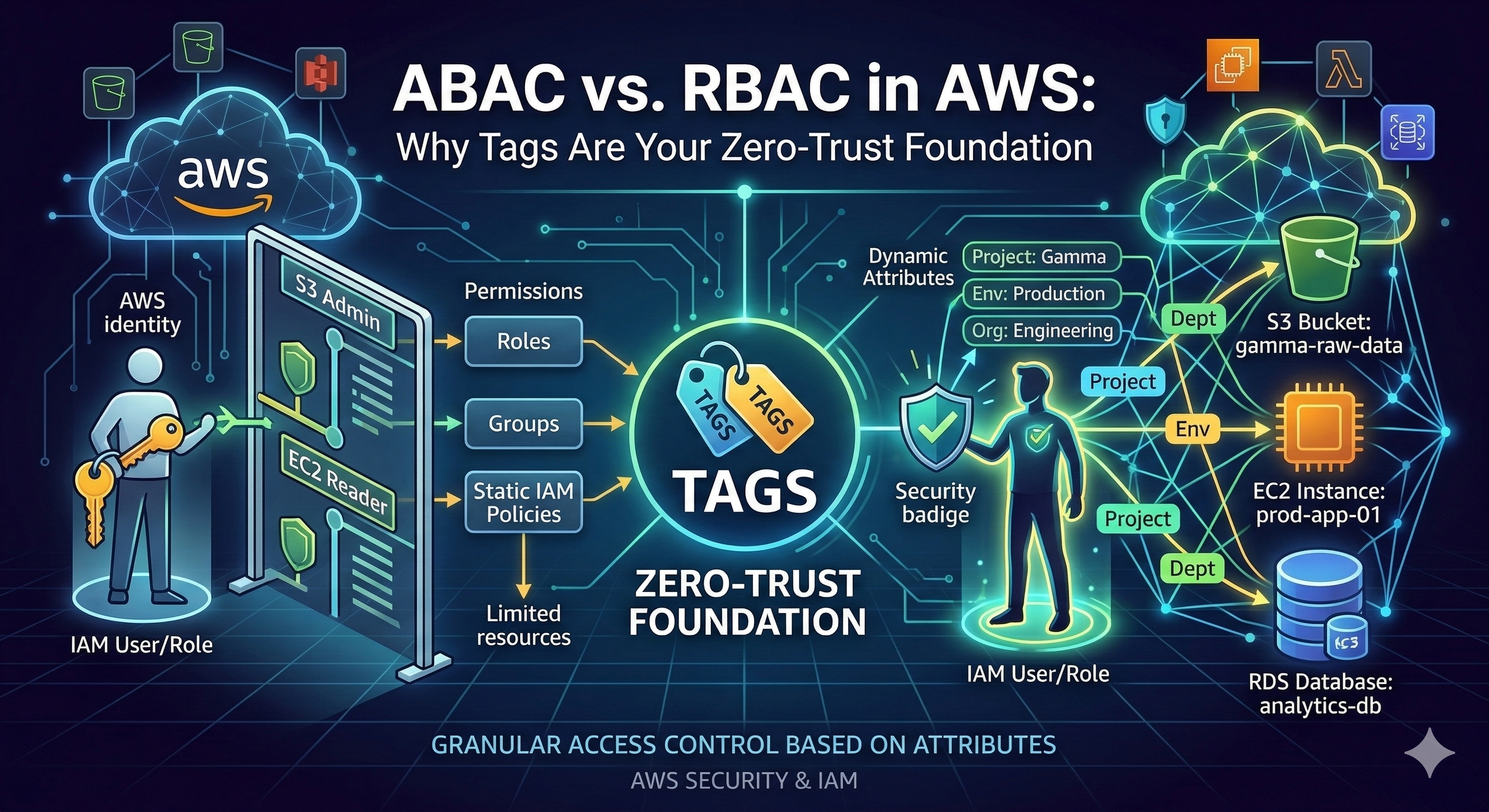
Most AWS environments don't have an access control strategy. They have a pile of IAM roles that grew one incident, one onboarding request, and one "just make it work" ticket at a time.
Many enterprises manage hundreds of unique IAM roles across their environments.
The Cloud Security Alliance's Top Threats to Cloud Computing 2024 ranks misconfiguration as the #1 cloud threat and IAM weaknesses as #2-both climbing from lower positions in 2022.
Palo Alto's Unit 42 observed a 116% increase in IAM-based impossible travel alerts in 2024 alone.
Cloud Security Alliance, Top Threats to Cloud Computing 2024; Palo Alto Unit 42, Cloud Security Alert Trends
The root cause isn't carelessness. It's that RBAC-the access model most teams default to-doesn't scale. And when it doesn't scale, teams cut corners.
This post breaks down the architectural differences between RBAC and ABAC in AWS, explains why tags are the missing piece for zero-trust access control, and shows how automated tagging turns ABAC from a nice idea into a deployable strategy.
What RBAC Looks Like in AWS
Role-Based Access Control ties permissions to job functions (understanding RBAC vs. ABAC in AWS). AWS ships managed policies like AdministratorAccess, PowerUserAccess,
and ReadOnlyAccess that map to broad role archetypes. Custom policies attach to IAM roles, and access is scoped by embedding resource ARNs
directly into policy statements.
The model is intuitive-and that's why everyone starts with it.
The Shared-Account Trap
Under pure RBAC-even with AWS Identity Center-isolating team access to specific resources within shared accounts requires either hardcoded ARN-based policies in each permission set, or a strict account-per-team strategy (AWS permission sets; ABAC with AWS SSO and Okta). Identity Center reduces role management overhead through reusable permission sets, but it doesn't solve the fundamental isolation problem: when two teams share an account, RBAC can only separate them by enumerating specific resources.
As teams and services grow, permission sets accumulate team-specific ARN lists that must be updated with every infrastructure change. This creates a direct coupling between infrastructure provisioning and identity management-every Terraform apply or CloudFormation stack potentially requires a corresponding IAM change.
The Least-Privilege Gap
This is especially painful when trying to achieve real least-privilege. In theory, RBAC policies should scope access to specific ARNs.
In practice, most teams don't bother-because maintaining ARN-level precision across hundreds of resources that change with every deployment is operationally
unsustainable. So teams default to "Resource": "*", granting the right actions but on all resources.
Here's what least-privilege RBAC is supposed to look like:
{
  "Version": "2012-10-17",
  "Statement": [
    {
      "Sid": "ListObjectsInBucket",
      "Effect": "Allow",
      "Action": ["s3:ListBucket"],
      "Resource": ["arn:aws:s3:::bucket-name"]
    },
    {
      "Sid": "GetObjectActions",
      "Effect": "Allow",
      "Action": "s3:GetObject",
      "Resource": ["arn:aws:s3:::bucket-name/*"]
    }
  ]
}
This policy is static. It knows about exactly one bucket. When the team provisions a second bucket, someone must update this policy. Multiply that by hundreds of resources across dozens of accounts, and IAM management becomes a full-time job-so nobody does it. Instead, the real-world version looks like this:
{
  "Version": "2012-10-17",
  "Statement": [
    {
      "Effect": "Allow",
      "Action": [
        "s3:ListBucket",
        "s3:GetObject"
      ],
      "Resource": "*"
    }
  ]
}
Action-level control with zero resource-level scoping. The team has "least-privilege" in the sense that they can only read S3-but they can read every bucket in the account, including ones belonging to other teams, other projects, and other data classifications.
This is the dirty secret of RBAC at scale: the gap between intended least-privilege and actual least-privilege is enormous, because the operational cost of maintaining ARN-scoped policies makes true resource-level isolation impractical.
What ABAC Changes
Attribute-Based Access Control flips the model. Instead of listing specific resource ARNs, ABAC policies use tag condition keys to match principal attributes against resource attributes at evaluation time. Permissions become dynamic-they resolve based on the metadata attached to the requester and the target resource.
AWS's own documentation states it plainly: ABAC requires fewer permission sets because you don't need to create different policies for different job functions. Permissions scale with innovation-new resources automatically inherit access rules based on their tags, without any policy modification (IAM Identity Center ABAC).
How It Works
ABAC leverages four global condition context keys (AWS global condition context keys):
| Condition Key | What It Checks | In Plain English |
|---|---|---|
aws:PrincipalTag/key |
Tags on the IAM principal making the request | Who is asking? |
aws:ResourceTag/key |
Tags on the target resource | What are they trying to access? |
aws:RequestTag/key |
Tags included in the API request | What tags are being applied? |
aws:TagKeys |
Tag keys present in the request | Which tag dimensions are involved? |
A single ABAC policy can govern access for every team, every environment, and every service-simultaneously:
{
  "Version": "2012-10-17",
  "Statement": [
    {
      "Effect": "Allow",
      "Action": [
        "ec2:StartInstances",
        "ec2:StopInstances"
      ],
      "Resource": "*",
      "Condition": {
        "StringEquals": {
          "ec2:ResourceTag/Department": "${aws:PrincipalTag/Department}"
        }
      }
    }
  ]
}
This policy grants EC2 start/stop permissions only when the principal's Department tag matches the instance's Department tag.
Notice the Resource: "*" - it's now safe, because the condition clause provides the resource-level scoping that ARNs used to
(configure ABAC policies in IAM Identity Center).
The permission boundary is defined by metadata, not by resource identifiers.
Why This Reduces Role Count
The math is structural. Under RBAC, every dimension of isolation (team, environment, project) is a multiplier on your role count. Under ABAC, each of those dimensions moves from "hardcoded in the policy" to "resolved from tags"-and every dimension you move eliminates a multiplier.
With ABAC, multiple users sharing the same IAM role (or Identity Center permission set) still get unique, fine-grained access because permissions resolve from their individual tag attributes. You can define attributes in AWS directly, or pass user attributes from your existing IdP (Okta, Google Workspace, Entra ID) into AWS via IAM Identity Center as session tags.
AWS's Secrets Manager team documented this exact pattern: one permission set, two users from different departments, each seeing only their own secrets-because
the ABAC policy matches aws:PrincipalTag/department against secretsmanager:ResourceTag/department.
RBAC vs. ABAC Side-by-Side
| Dimension | RBAC | ABAC |
|---|---|---|
| Permission Granularity | Coarse-tied to role/function | Fine-grained-down to individual resource attributes |
| Scalability | Linear role/policy growth with teams and resources | Flat-one policy handles N teams |
| New Resource Onboarding | Policy update required (or use Resource: *) |
Automatic if tagged correctly |
| New User Onboarding | Assign to role + verify scope | Apply tags; access resolves instantly |
| Policy Management | High-different policy per function | Low-fewer permission sets needed |
| Least Privilege | Requires ARN-level maintenance (rarely done) | Achieved via tag matching on Resource: * |
| Blast Radius | Entire role scope (often over-permissioned) | Limited to resources with matching tag values |
| Setup Complexity | Low initial effort | Higher-requires a tagging strategy first |
ABAC as a Zero-Trust Primitive
Zero trust is built on the principle that access decisions should never rely on network location alone. It requires continuous identity verification and fine-grained, context-aware authorization.
ABAC is the natural IAM implementation pattern for this model. NIST SP 800-162 defines ABAC as a model that "evaluates rules against the attributes of entities, operations, and the environment relevant to a request", and NIST SP 800-207A specifically references ABAC for zero trust architecture in cloud-native applications. Zero trust on AWS outlines how ABAC fits this model; Forrester reports that 82% of organizations plan to adopt or expand zero trust initiatives.
How ABAC Enforces Zero-Trust Principles
- Continuous verification: Every API call is evaluated against current tag values. If a resource's
Environmenttag changes fromdevtoprod, access decisions change immediately-no policy update needed. - Least privilege by default: A principal without matching tags is denied. There is no implicit broad access.
- Microsegmentation via metadata: Tags like
Department,Project, andDataClassificationcreate logical security boundaries decoupled from network topology. This contains lateral movement after credential compromise-the attacker is confined to the tag scope of the compromised principal. - Auditability: The
SourceIdentityattribute is logged in CloudTrail for every action, enabling full attribution even with role chaining.
Blast Radius Containment
Under RBAC, a compromised role with PowerUserAccess gives an attacker broad access across all resources. Under ABAC, the same compromise is contained:
the attacker can only interact with resources whose tags match the compromised principal's tags.
If the principal is tagged Department:Engineering and Environment:Dev, production resources tagged Environment:Prod remain
inaccessible-regardless of the actions permitted in the policy. Blast radius shrinks from "everything the role allows" to "everything with matching attributes."
The Tagging Problem: ABAC's Achilles' Heel
ABAC is only as strong as the tags it evaluates. Inconsistent, missing, or manipulated tags don't just create access gaps-they become security vulnerabilities.
Three Ways Tags Break ABAC
1. Missing tags. An untagged resource falls outside ABAC governance entirely. A Deny policy conditioned on aws:ResourceTag/Environment has no effect if the resource lacks an Environment tag. The resource becomes invisible to your security model.
2. Inconsistent tags. Production, production, prod, and PROD are four different values to IAM policy evaluation. Any mismatch between principal and resource tags creates either silent access denials (users locked out) or silent grants (unintended access).
3. Tag manipulation. The most dangerous failure mode. If a user has ec2:CreateTags permission without guardrails, they can retag a resource to match their own attributes-a direct privilege escalation path. Praetorian specifically recommends limiting tagging actions to strict scopes to prevent this.
Mitigating Tag Manipulation with SCPs
AWS Organizations Service Control Policies can lock down tag modification at the organization level:
{
  "Version": "2012-10-17",
  "Statement": [
    {
      "Sid": "PreventTagModification",
      "Effect": "Deny",
      "Action": [
        "ec2:CreateTags",
        "ec2:DeleteTags"
      ],
      "Resource": "*",
      "Condition": {
        "ForAnyValue:StringEquals": {
          "aws:TagKeys": ["Department", "Environment", "SecurityZone"]
        },
        "StringNotLike": {
          "aws:PrincipalArn": "arn:aws:iam::*:role/TagAdmin*"
        }
      }
    }
  ]
}
This creates separation of duties: application teams tag for cost allocation and operations, but ABAC-critical tags are locked to a dedicated tagging role.
But SCPs and Tag Policies have a fundamental limitation: they enforce and validate, but they don't maintain tags (SCP vs Tag Policy). They can't help when resources need re-tagging, when projects shift, or when your tagging strategy evolves. They're reactive guardrails, not proactive governance.
Why Native AWS Tools Aren't Enough
| Tool | What It Does | What It Doesn't Do |
|---|---|---|
| Tag Policies | Validates tag key/value compliance after creation | Can't prevent resource creation; doesn't fix drift |
| SCPs | Blocks resource creation without required tags | Can't validate value formats; doesn't fix drift |
| AWS Config Rules | Detects non-compliance after creation | Reactive only; no auto-remediation |
| Tagging API | Programmatic tag management | Requires custom automation; no governance logic |
The gap: AWS provides enforcement primitives, but no continuous tagging lifecycle management. Tags drift as teams change, projects evolve, and resources get repurposed. Without active maintenance, ABAC policies start producing unexpected access decisions within weeks.
How TagOps Closes the Gap
TagOps is an automated AWS tagging platform purpose-built for this problem (Implementing ABAC with TagOps). It connects to your AWS environment, discovers untagged and mis-tagged resources, and applies consistent tagging rules at scale-the exact foundation ABAC requires.
What It Does for ABAC
- Auto-tags existing resources: Bulk-tag your untagged infrastructure without manual console work. TagOps scans and applies rules to resources that already exist.
- Tags new resources in real time: Event-driven discovery tags new resources seconds after creation. Combined with scheduled scans, nothing slips through.
- Tag immutability and auto-remediation: If someone modifies a tag outside TagOps-accidentally or maliciously-TagOps automatically rolls it back to the correct value. This closes the privilege escalation vector without relying solely on SCPs.
- Visual rule engine: Define tagging logic with if-then conditions-no scripting required. Rules can match on resource type, region, account, existing tags, and resource name.
- 22+ built-in templates: Pre-configured rules for common tagging patterns (environment, cost center, owner) accelerate deployment.
- Continuous compliance monitoring: Track tag coverage, detect drift, and maintain compliance automatically.
The ABAC + TagOps Architecture
The architecture combines IdP-driven principal tagging with TagOps-driven resource tagging:
Google Workspace / Okta / Entra ID. SAML attributes: Department, Project, Team.
Session tags: aws:PrincipalTag/Department = "RnD". PrincipalTag passed from IdP.
ABAC policies: StringEquals on aws:ResourceTag/Department and aws:PrincipalTag/Department. Evaluates at request time.
EC2, S3, RDS, Lambda, Secrets Manager, etc. Resource tags: Department=RnD, Env=Prod, Project=X.
Auto-tags new resources in real time; remediates tag drift and unauthorized changes; enforces rules across accounts and regions; continuous tagging compliance monitoring.
TagOps sits at the resource tagging layer-the foundation that all ABAC policy evaluation depends on. Without consistent resource tags, ABAC evaluates against incomplete or incorrect data. With TagOps, every resource is tagged correctly, every tag stays correct, and ABAC operates as designed.
The Bottom Line
RBAC was designed for a world where organizations could enumerate their resources and map them to a manageable set of job functions. That world no longer exists. Modern AWS environments demand access control that scales with infrastructure, adapts to organizational change, and contains blast radius by design.
ABAC delivers on all three-but only when the tagging foundation is solid. The combination of ABAC policies with automated, immutable tagging through TagOps creates a zero-trust access control architecture where permissions are dynamic, auditable, and resistant to both drift and manipulation.
Fewer roles to audit. Fewer policies to maintain. Smaller blast radius on compromise. For security architects building a zero-trust roadmap, the message is clear: your tags are your security perimeter. Invest accordingly.
Ready to Build Your ABAC Foundation?
Start a free 14-day TagOps trial-no credit card required. Automate tagging so ABAC works at scale.
Get TagOps on AWS Marketplace