Failed to Tag Resources
Overview
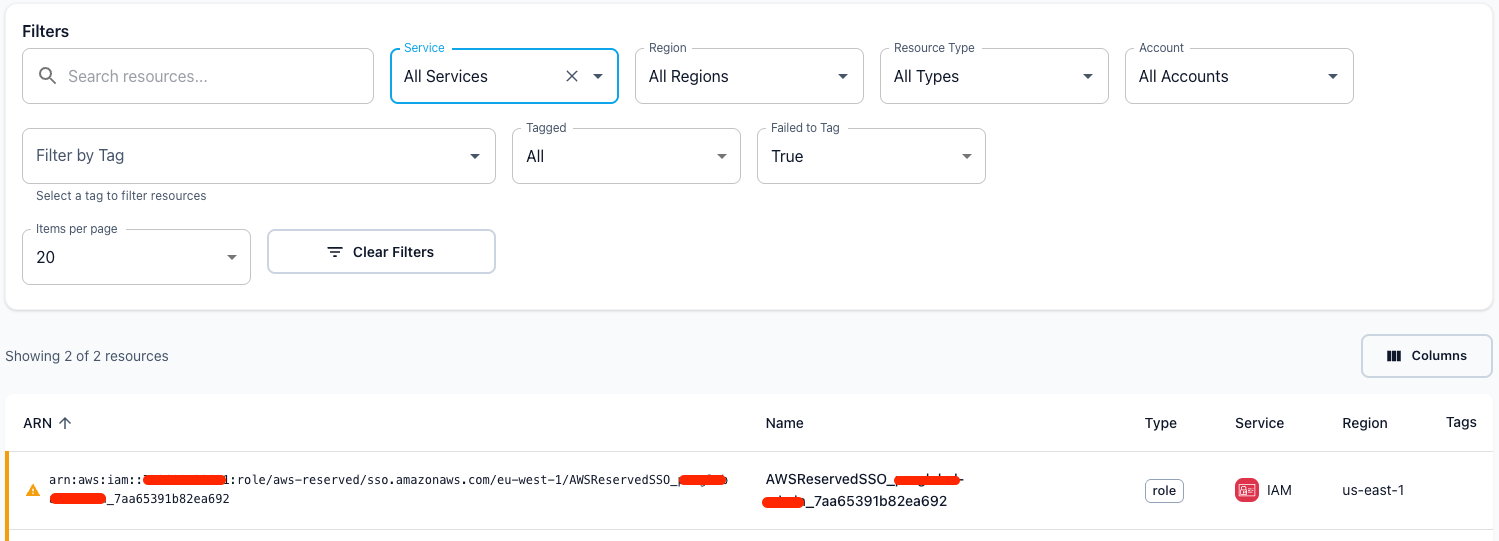
When TagOps attempts to tag a resource but fails, the resource is marked with a warning indicator. This feature helps identify resources that require attention due to tagging failures. All failed resources can be easily identified and filtered in the Resource Inventory page.
How It Works
When TagOps tries to apply tags to a resource during a scan or event-based tagging operation:
- Tagging Attempt: TagOps attempts to apply the configured tags to the resource
- Failure Detection: If the tagging operation fails, the resource is marked with a warning
- Visual Indicator: Resources with failed tagging attempts display a warning icon (⚠️) in the inventory
- Warning Message: The warning states: "This resource failed to be tagged automatically"
- Filtering: Use the "Failed to Tag" filter in the Resource Inventory to view all affected resources
Identifying Failed Resources
To identify resources that failed tagging:
- Navigate to the Resource Inventory page
- Click on the filter dropdown
- Select "Failed to Tag" from the filter options
- Review the list of resources that failed tagging attempts
- Resources with failed tagging attempts display a warning icon (⚠️) next to their name
Common Causes and Solutions
1. Missing Permissions for TagOps Role
Problem: The TagOps IAM role lacks the required permissions to tag the resource.
Symptoms:
- Resources fail to tag consistently for a specific service type
- Warning icon and message that TagOps IAM Role missing permissions in "AWS Accounts" menu
Solutions:
- For detailed steps on resolving permission issues, see Account Permissions Warning in the Troubleshooting guide.
2. Resource-Based Policies
Problem: The resource has a policy (bucket policy, ECR policy, etc.) that prevents TagOps from tagging it.
Symptoms:
- Specific resources fail to tag while others from the same type succeed
- Resources in certain accounts fail to tag (account-specific policy restrictions)
- Resources with specific configurations fail (e.g., encrypted resources, resources with specific tags)
Solutions:
- Check resource based policies for tagging restrictions
- Look for
"Effect": "Deny"statements that might block tagging - Add the TagOps role ARN to the resource policy's allowed principals
- Ensure the policy grants tagging permissions
- Ensure TagOps role meets all policy conditions
3. Service Control Policies (SCP)
Problem: Organization-level Service Control Policies prevent tagging operations.
Symptoms: - All resources from the same type in an account fail to tag - Consistent failures across multiple resource types
Solutions:
- Check for SCPs that deny tagging actions
- Look for tag-based restrictions in SCPs
- Verify SCPs don't block the TagOps role
Note: SCPs affect all principals in the organization, so changes require coordination with your organization's security and compliance teams.
4. AWS Managed Resources
Problem: The resource is managed by AWS and cannot be tagged by external services.
Common Examples:
- AWS SSO IAM Roles: Roles created by AWS SSO are managed by AWS and may have tagging restrictions
- Auto Scaling Group Managed Resources: EventBridge rules and other resources created automatically by Auto Scaling Groups
- AWS Managed Policies: IAM policies managed by AWS (e.g.,
AmazonS3ReadOnlyAccess)
Solutions:These resources are typically read-only and cannot be tagged by design