Enforcing Resource Ownership and Department-Based Access with Tags
Use tag-based access control (ABAC) to ensure only the resource owner or specified department team members can access and manage AWS resources. This approach prevents unauthorized access and offers scalable, efficient permission management.
Problem Statement
Organizations must ensure only authorized users can access or manage specific resources, avoiding accidental or intentional exposure, modification, or deletion. Traditional IAM roles require manual policy updates when organizational structure changes, making management error-prone and inefficient.
Standard Role-Based Access Control (RBAC) lacks the fine-grained control needed to restrict user actions based on the specific context or sensitivity of a resource.
Critical tags used for security authorization may be modified by unauthorized principals.
Solution Overview
By leveraging Owner and Department tags on both IAM principals (users/roles) and AWS resources, TagOps enables attribute-based access control (ABAC). IAM policies reference these tags, ensuring access is granted only when the user's tags match the corresponding resource tags.
Implement Attribute-Based Access Control (ABAC) by using tags within IAM policy conditions. Use the aws:ResourceTag/key-name condition key to control actions (e.g., ec2:StopInstances) only if the resource has matching tags (e.g., the owner's identity)
Use Service Control Policies (SCPs) or IAM policies with aws:RequestTag to prevent the creation of resources without mandatory tags or with non-compliant tag values (e.g., restricting the environment tag value to preprod or production)
Prerequisites
- IAM permissions to create and modify policies
- Permission to tag AWS resources (EC2, S3, RDS, Lambda, etc.)
- Principal entities (users/roles) tagged correctly with Owner or Department values
- Organizational agreement on tag schema
Step-by-Step Implementation
- Define and document the Owner and Department tags and their values according to your organization's schema.
- Tag all IAM principals (users/roles) with appropriate Owner and/or Department keys, leveraging AWS IAM Identity Center or SSO providers if applicable.
- Configure TagOps rules to automatically tag AWS resources with the corresponding Owner and/or Department values based on your tagging policy. TagOps will apply these tags automatically when resources are created or discovered.
- Create an IAM policy using condition keys (e.g., aws:PrincipalTag/Owner, aws:ResourceTag/Owner) to allow or deny actions based on tag match.
- Attach the policy to the relevant IAM entities.
- Use TagOps to automate tagging rule enforcement, ongoing tag compliance and tag immutability.
Your TagOps rules can look like this:
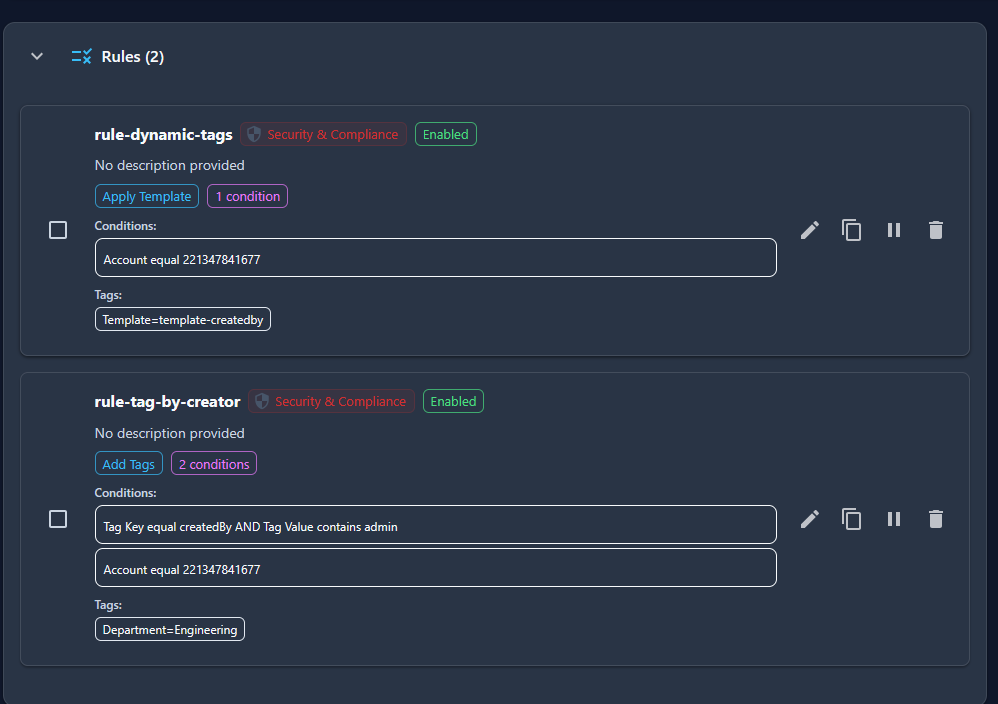 Note that you have 2 rules - 1 rule with dynamic tags that adds the createdBy tag.
2nd rule has the actual tags we would like to add for our tag based access control, to control access with (In this case Department).
This way you achieve maximum granularity in your tagging strategy.
Note that you have 2 rules - 1 rule with dynamic tags that adds the createdBy tag.
2nd rule has the actual tags we would like to add for our tag based access control, to control access with (In this case Department).
This way you achieve maximum granularity in your tagging strategy.
Configuration Examples
Tagops rule to automate creation of Owner & Department tags:
IAM Policy Example to Allow Access Only to Owners:
{
  "Version": "2012-10-17",
  "Statement": [
    {
      "Effect": "Allow",
      "Action": "rds:*",
      "Resource": "*",
      "Condition": {
        "StringEquals": {
          "rds:db-tag/Owner": "${aws:username}"
        }
      }
    }
  ]
}
IAM Policy Example for Department Access:
{
  "Version": "2012-10-17",
  "Statement": [
    {
      "Effect": "Allow",
      "Action": ["ec2:StartInstances", "ec2:StopInstances"],
      "Resource": "*",
      "Condition": {
        "StringEquals": {
          "aws:ResourceTag/Department": "${aws:PrincipalTag/Department}"
        }
      }
    }
  ]
}
Verification
- Attempt access with a user whose tags match the resource's Owner or Department. Action should succeed.
- Attempt access with a user whose tags do not match. Action should be denied.
- Review CloudTrail logs for denied or allowed actions based on tag enforcement.
Best Practices
- Adopt a comprehensive tagging strategy documented and maintained centrally (with clear Owner and Department tag definitions and allowed values).
- Adopt the principle of least privilege and restrict tag editing permissions to trusted administrators to avoid privilege escalation.
- Leverage TagOps, AWS Config rules, and Resource Groups Tag Editor to audit and enforce tag compliance across accounts and environments.
- Use automation to check for missing or misconfigured tags and remediate promptly.
- Integrate tagging and tag-based access control into onboarding/offboarding processes and change management.
- Regularly audit tags and IAM policies to prevent drift and maintain compliance.
Troubleshooting
If access is denied, verify:
- That the user, role, and resource have matching, correctly cased tag keys and values.
- The IAM and resource policies reference correct tag keys and comply with AWS service condition key support.
- Tag enforcement is functional in all relevant AWS accounts.
- Tags are not missing or misconfigured due to automated deployment scripts.
- Use AWS Policy Simulator and CloudTrail to diagnose denied actions and to test policy intent.