CloudFormation Integration
TagOps CloudFormation integration automatically adds tags to resources in your CloudFormation templates at deploy time.
Video walkthrough
The following video explains TagOps CloudFormation integration end to end. If the player does not appear, watch on YouTube.
CloudFormation Macros
This feature is built on the AWS CloudFormation Macros capability. CloudFormation macros let you run custom processing on templates before deployment, from simple string replacements to full template transformations. When you declare a macro in the Transform section of your template, CloudFormation invokes the associated Lambda function, passes the template content to it, and uses the returned result as the processed template.
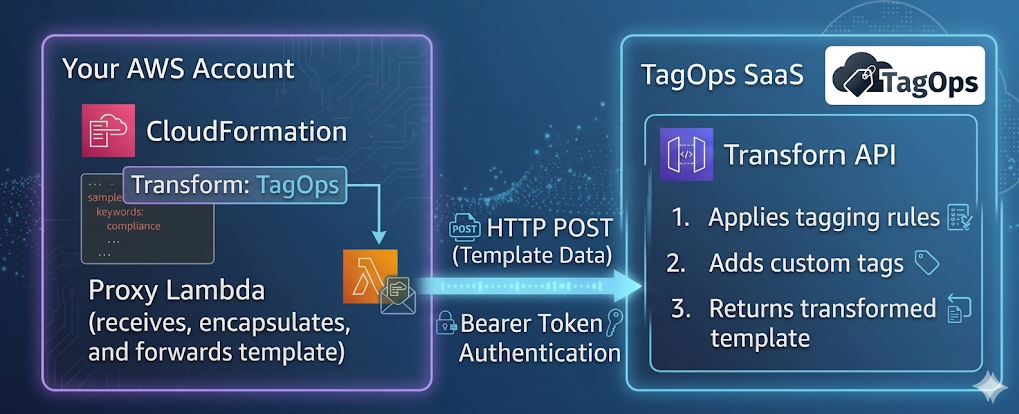
TagOps uses this mechanism to inject tags into your resources according to the "Tagging Rules" and "Account Settings": the macro’s Lambda function receives your template, sends it to the TagOps SaaS API for transformation, and returns the tagged template to CloudFormation.
For more details on how macros work, see the AWS CloudFormation Macros documentation.
How It Works
- You add
Transform: TagOpsto your CloudFormation template. - When you deploy the stack, CloudFormation invokes the proxy Lambda in your account.
- The proxy Lambda sends the template fragment to the TagOps SaaS API for transformation.
- The SaaS API applies tagging rules and custom tags, then returns the transformed template.
- CloudFormation continues deployment with the tagged resources.
Prerequisites
- API token for authentication. See API Tokens for how to create and manage tokens.
- TagOps CloudFormation macro activated in your account (see Enabling below).
Enabling the CloudFormation Macro
The CloudFormation macro is activated through the TagOps onboarding CloudFormation stack - the same stack used to connect your AWS account or organization to TagOps.
Steps
- Open the TagOps onboarding CloudFormation stack in your AWS account (for single account) or organization management account (for AWS Organizations).
- Click Update on the stack.
- Set the Activate CloudFormation Macro parameter to
true. - Enter your TagOps API token in the API Token parameter. You can create a token from the TagOps console under Settings → API Tokens (see API Tokens).
- Complete the stack update.

CloudFormation will create the following resources in your account (in each onboarded region):
| Resource | Type | Description |
|---|---|---|
CloudFormation Macro (TagOps) |
AWS::CloudFormation::Macro |
Registers the macro name so you can use Transform: TagOps in your templates. |
Proxy Lambda (lambda-tagops-macro-proxy) |
AWS::Lambda::Function |
Receives the template from CloudFormation and forwards it to the TagOps SaaS API for transformation. |
Secrets Manager Secret (secret-tagops-macros-api-token-*) |
AWS::SecretsManager::Secret |
Stores the API token securely. The proxy Lambda retrieves the token from here at runtime. |
All three resources are created conditionally - only when Activate CloudFormation Macro is set to true. Setting it back to false removes them.
Updating the API Token
If your API token has been rotated, expired, or you want to use a different token:
- Open the TagOps onboarding CloudFormation stack in the AWS Console.
- Click Update on the stack.
- Enter the new API token in the API Token parameter.
- Complete the stack update.
CloudFormation will update the Secrets Manager secret with the new token value. The proxy Lambda reads the token from Secrets Manager at runtime, so the change takes effect immediately - no Lambda redeployment is needed.
Disabling
To disable the macro, update the onboarding stack and set Activate CloudFormation Macro back to false. CloudFormation will delete the macro, Lambda, and secret. Existing stacks that were deployed with the macro are not affected - the tags already applied remain on the resources.
Basic Usage
Add the Transform declaration to your template:
AWSTemplateFormatVersion: '2010-09-09'
Description: 'Example template using TagOps CloudFormation Macro'
Transform: TagOps

Resources:
  ExampleVpc:
    Type: AWS::EC2::VPC
    Properties:
      CidrBlock: 10.0.0.0/16
      EnableDnsSupport: true
      EnableDnsHostnames: true
      Tags:
      - Key: Name
        Value: vpc-dev
Resources that support tagging will receive tags from your TagOps rules and any custom tags you define.
Metadata Options
TagOps uses metadata at the template and resource level to control behavior.
Template-Level Metadata
Metadata at the root of the template applies to the whole template.
| Option | Type | Required | Description |
|---|---|---|---|
TagOpsCustomTags |
Object or String | No | Custom tags to apply to all resources. Can be a YAML object or a JSON string. |
* Required when the proxy Lambda is configured to read the token from Metadata.ApiToken. When using Secrets Manager, omit this from the template.
Resource-Level Metadata
Metadata on individual resources controls tagging for that resource.
| Option | Type | Required | Description |
|---|---|---|---|
TagOpsIgnoreResource |
Boolean | No | When true, the resource is skipped by the macro. No tags are added. Use for resources that are not taggable or that you want to exclude from TagOps processing. |
Example: Template with All Metadata Options
AWSTemplateFormatVersion: '2010-09-09'
Description: 'Example template using TagOps CloudFormation Macro'
Transform: TagOps

Metadata:
  TagOpsCustomTags:
    project: example-project
    team: devops
    cost-center: engineering

Resources:
  ExampleBucket:
    Type: AWS::S3::Bucket
    Properties:
      BucketName: !Sub '${AWS::StackName}-example-bucket'
      VersioningConfiguration:
        Status: Enabled
      Tags:
      - Key: ct1
        Value: vt1

  ExampleParameter:
    Type: AWS::SSM::Parameter
    Properties:
      Name: !Sub '/${AWS::StackName}/example-parameter'
      Type: String
      Value: example-value

  ExampleRole:
    Type: AWS::IAM::Role
    Metadata:
      TagOpsIgnoreResource: true   # Skip this resource - IAM Role does not support tags
    Properties:
      RoleName: !Sub '${AWS::StackName}-example-role'
      AssumeRolePolicyDocument:
        Version: '2012-10-17'
        Statement:
        - Effect: Allow
          Principal:
            Service: ec2.amazonaws.com
          Action: sts:AssumeRole
      ManagedPolicyArns:
      - arn:aws:iam::aws:policy/AmazonS3ReadOnlyAccess
TagOpsCustomTags Formats
As YAML object:
Metadata:
  TagOpsCustomTags:
    project: my-project
    team: platform
    environment: production
As JSON string:
Metadata:
  TagOpsCustomTags: '{"project": "my-project", "team": "platform", "environment": "production"}'
Tag Calculation
For each resource in the template, TagOps calculates the final set of tags by merging three sources. Tags from higher-priority sources override tags with the same key from lower-priority sources.
Tag Sources (in order of priority, lowest to highest)
| Priority | Source | Description |
|---|---|---|
| 1 (lowest) | TagOpsCustomTags (template Metadata) | Custom tags defined in the template's Metadata.TagOpsCustomTags section. Applied to all resources. |
| 2 | Resource Tags (template) | Tags already defined on the resource in the CloudFormation template (e.g., Properties.Tags). |
| 3 (highest) | TagOps Rule Tags | Tags calculated dynamically by TagOps based on your tagging rules and account settings (e.g., rule-based tags, dynamic tags). |
Merge Behavior
- Tags are merged by key. If the same key exists in multiple sources, the higher-priority source wins.
- Existing resource tags in the template are preserved unless a TagOps rule explicitly sets the same key.
TagOpsCustomTagsserve as baseline tags - they are applied to every resource but can be overridden by resource-level tags or rule tags.
Example
Given this template:
Metadata:
  TagOpsCustomTags:
    environment: staging
    team: platform

Resources:
  MyBucket:
    Type: AWS::S3::Bucket
    Properties:
      Tags:
      - Key: team
        Value: data-engineering
      - Key: app
        Value: my-app
And a TagOps rule that adds cost-center: engineering, the final tags on MyBucket will be:
| Key | Value | Source |
|---|---|---|
environment |
staging |
TagOpsCustomTags |
team |
data-engineering |
Resource Tags (overrides platform from TagOpsCustomTags) |
app |
my-app |
Resource Tags |
cost-center |
engineering |
TagOps Rule Tags |
Limitations
-
created-bydynamic tag is not available. The CloudFormation macro is invoked by the CloudFormation service itself, not by the user who initiated the stack deployment. The macro event does not contain information about the original IAM user or role that calledCreateStack. Therefore, TagOps cannot determine who created the resource. With Event-Based Tagging, CloudTrail captures the actual IAM identity that triggered the API call, makingcreated-byavailable. -
creation-datedynamic tag is not available. The macro transforms the template before resources are created - at transformation time, the resources do not exist yet and have no creation timestamp. With Event-Based Tagging, the tag is set from the real CloudTrail event timestamp when the resource is actually created.
Supported Resources
TagOps applies tags to resources that support the Tags or TagSpecifications property. See Supported Services for the full list of resource types.