Terraform Integration
TagOps Terraform integration automatically calculates tags for your resources at deploy time. You include the TagOps module in your Terraform configuration, and it returns computed tags based on your tagging rules - which you then apply to your resources.
Video walkthrough
The following video explains TagOps Terraform integration end to end. If the player does not appear, watch on YouTube.
Terraform Module
This feature is built on a public Terraform module: terraform-aws-tagops. The module sends your resource definitions to the TagOps SaaS API and returns the computed tags as a Terraform output map. You reference the output map to apply tags to your resources.
The module is published on the Terraform Registry.
How It Works
- You add
module "tagops"to your Terraform configuration and define which resources need tags. - On every
terraform planorterraform apply, the module sends a request to the TagOps SaaS API. - The API applies your tagging rules and returns computed tags for each resource.
- You use
module.tagops.tags["<resource_key>"]to apply the tags to your resources.
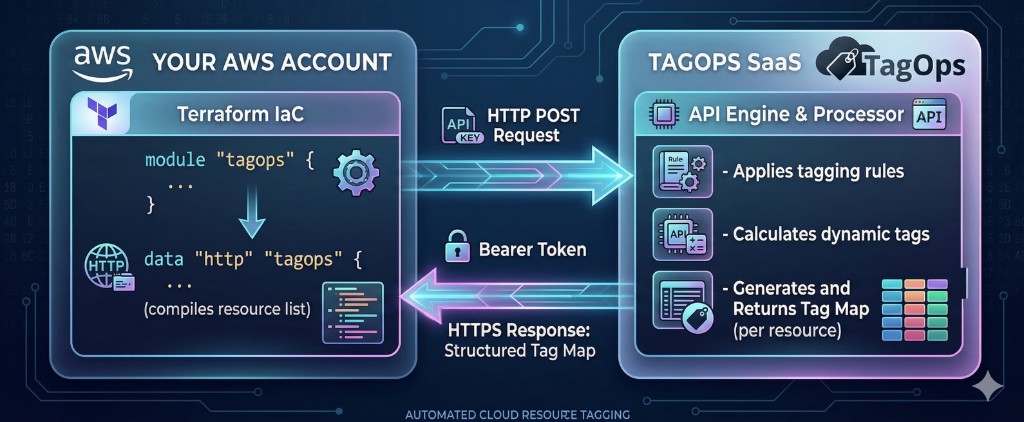
The module makes a fresh API request on every plan/apply run, so changes to your tagging rules in TagOps are reflected immediately - no module update or cache invalidation is needed.
Prerequisites
- API token for authentication. See API Tokens for how to create and manage tokens.
- Terraform >= 1.5.0
- AWS provider >= 4.0.0
Installation
Add the TagOps module to your Terraform configuration:
module "tagops" {
  source  = "tagops/tagops/aws"
  version = "~> 0.1.1"

  api_token = data.aws_ssm_parameter.tagops_api_token.value
  # ...
}
Or reference the GitHub repository directly:
module "tagops" {
  source = "git::https://github.com/tagops/terraform-aws-tagops.git?ref=main"

  api_token = data.aws_ssm_parameter.tagops_api_token.value
  # ...
}
Storing the API Token
Store your API token securely using AWS Secrets Manager, AWS SSM Parameter Store (as a SecureString), or another secret store. Never hardcode API tokens in your Terraform files or commit them to version control.
SSM Parameter Store (SecureString):
data "aws_ssm_parameter" "tagops_api_token" {
  name            = "/tagops/api_token"
  with_decryption = true
}

module "tagops" {
  source    = "tagops/tagops/aws"
  version   = "~> 0.1.1"
  api_token = data.aws_ssm_parameter.tagops_api_token.value
  # ...
}
AWS Secrets Manager:
data "aws_secretsmanager_secret_version" "tagops_api_token" {
  secret_id = "tagops/api_token"
}

module "tagops" {
  source    = "tagops/tagops/aws"
  version   = "~> 0.1.1"
  api_token = data.aws_secretsmanager_secret_version.tagops_api_token.secret_string
  # ...
}
Module Variables
| Variable | Type | Required | Default | Description |
|---|---|---|---|---|
api_token |
string |
yes | - | TagOps API token. Marked as sensitive. |
api_url |
string |
no | https://api.tagops.cloud/terraform |
TagOps API endpoint URL. |
default_tags |
map(string) |
no | {} |
Default tags sent for all tag calculations. |
default_resources |
list(string) |
no | [] |
List of Terraform resource types for tag calculation. |
custom_resources |
map(object) |
no | {} |
Map of resources with type, name, and optional tags. |
Module Outputs
| Output | Description |
|---|---|
tags |
Map of computed tags keyed by resource identifier. |
status_code |
HTTP status code from the TagOps API. |
Usage
Default Resources
Use default_resources when your TagOps rules do not depend on individual resource names or existing tag values. All resources of the same type receive the same set of tags. This is the simplest approach and can be demostrated well with community modules like terraform-aws-modules/vpc/aws.
Each resource type in the list produces a tag entry keyed as default_<resource_type>.
locals {
  default_tags = {
    managed-by       = "terraform"
    environment-name = "production"
  }
}

data "aws_ssm_parameter" "tagops_api_token" {
  name            = "/tagops/api_token"
  with_decryption = true
}

module "tagops" {
  source       = "tagops/tagops/aws"
  version      = "~> 0.1.1"
  api_token    = data.aws_ssm_parameter.tagops_api_token.value
  default_tags = local.default_tags
  default_resources = [
    "aws_vpc",
    "aws_subnet",
    "aws_internet_gateway",
    "aws_route_table",
    "aws_nat_gateway",
    "aws_eip",
    "aws_network_acl",
    "aws_security_group",
  ]
}

module "vpc" {
  source  = "terraform-aws-modules/vpc/aws"
  version = "6.5.1"
  name    = "production"
  cidr    = "10.0.0.0/16"
  # ...

  vpc_tags         = merge(module.tagops.tags["default_aws_vpc"], { Name = "vpc-production" })
  igw_tags         = merge(module.tagops.tags["default_aws_internet_gateway"], { Name = "igw-production" })
  nat_gateway_tags = merge(module.tagops.tags["default_aws_nat_gateway"], { Name = "nat-production" })
  nat_eip_tags     = merge(module.tagops.tags["default_aws_eip"], { Name = "eip-production-nat" })
}
Custom Resources
Use custom_resources when your TagOps rules do depend on individual resource names or existing tag values - meaning different resources of the same type may receive different tags.
Each entry in the map is keyed by a name you choose. The key is used to reference the computed tags in module.tagops.tags["<key>"].
module "tagops" {
  source       = "tagops/tagops/aws"
  version      = "~> 0.1.1"
  api_token    = data.aws_ssm_parameter.tagops_api_token.value
  default_tags = local.default_tags
  custom_resources = {
    s3_logs = {
      type = "aws_s3_bucket"
      name = "s3-bucket-for-logs-123456789012"
      tags = {
        app     = "logs"
        product = "tagops"
      }
    }
    s3_test = {
      type = "aws_s3_bucket"
      name = "s3-bucket-test-123456789012"
      tags = {
        app     = "test"
        product = "tagops"
      }
    }
  }
}

module "s3_bucket_for_logs" {
  source = "terraform-aws-modules/s3-bucket/aws"
  bucket = "s3-bucket-for-logs-123456789012"

  tags = merge({
    app     = "logs"
    product = "tagops"
  }, module.tagops.tags["s3_logs"])
}

module "s3_bucket_test" {
  source = "terraform-aws-modules/s3-bucket/aws"
  bucket = "s3-bucket-test-123456789012"

  tags = merge({
    app     = "test"
    product = "tagops"
  }, module.tagops.tags["s3_test"])
}
Combining Default and Custom Resources
You can use both default_resources and custom_resources together. They are merged internally into a single API request:
module "tagops" {
  source       = "tagops/tagops/aws"
  version      = "~> 0.1.1"
  api_token    = data.aws_ssm_parameter.tagops_api_token.value
  default_tags = local.default_tags

  default_resources = ["aws_vpc", "aws_subnet"]

  custom_resources = {
    web_server = {
      type = "aws_instance"
      name = "web-production-01"
      tags = { Name = "web-production-01" }
    }
  }
}
Multi AWS Providers (Multi-Region/Account)
The module detects the AWS account ID and region from the AWS provider. When you manage resources across multiple regions/accounts, create a separate TagOps module instance for each region/account and pass an aliased provider using the providers block. Each instance makes its own API call with the correct region/account.
provider "aws" {
  default_tags {
    tags = local.default_tags
  }
}

provider "aws" {
  alias  = "us-east-1"
  region = "us-east-1"
  default_tags {
    tags = local.default_tags
  }
}

# Default region
module "tagops" {
  source       = "tagops/tagops/aws"
  version      = "~> 0.1.1"
  api_token    = data.aws_ssm_parameter.tagops_api_token.value
  default_tags = local.default_tags
  custom_resources = {
    foo = {
      type = "aws_ssm_parameter"
      name = "foo"
      tags = { app = "test", product = "tagops" }
    }
  }
}

# us-east-1 region
module "tagops_us_east_1" {
  source       = "tagops/tagops/aws"
  version      = "~> 0.1.1"
  providers = {
    aws = aws.us-east-1
  }
  api_token    = data.aws_ssm_parameter.tagops_api_token.value
  default_tags = local.default_tags
  custom_resources = {
    foo2 = {
      type = "aws_ssm_parameter"
      name = "foo2"
      tags = { app = "test", product = "tagops" }
    }
  }
}

resource "aws_ssm_parameter" "foo" {
  name  = "foo"
  type  = "String"
  value = "bar"
  tags  = merge({ app = "test", product = "tagops" }, module.tagops.tags["foo"])
}

resource "aws_ssm_parameter" "foo2" {
  provider = aws.us-east-1
  name     = "foo2"
  type     = "String"
  value    = "bar2"
  tags     = merge({ app = "test", product = "tagops" }, module.tagops_us_east_1.tags["foo2"])
}
Default Tags
The default_tags variable sends baseline tags to TagOps for every resource in the request. This should typically match the tags in your AWS provider default_tags block, so TagOps rules can evaluate against the full set of tags each resource will have.
locals {
  default_tags = {
    managed-by       = "terraform"
    environment-name = "production"
    environment-type = "prod"
    product          = "tagops"
  }
}

provider "aws" {
  region = "us-east-1"
  default_tags {
    tags = local.default_tags
  }
}

module "tagops" {
  # ...
  default_tags = local.default_tags
}
Tag Calculation
For each resource in the request, TagOps calculates the final set of tags by merging three sources. Tags from higher-priority sources override tags with the same key from lower-priority sources.
Tag Sources (in order of priority, lowest to highest)
| Priority | Source | Description |
|---|---|---|
| 1 (lowest) | Default Tags (default_tags variable) |
Baseline tags sent with the request. Applied to all resources. |
| 2 | Resource Tags (tags in custom_resources) |
Existing tags on the resource, passed via custom_resources. |
| 3 (highest) | TagOps Rule Tags | Tags calculated by TagOps based on your tagging rules and account settings. |
Merge Behavior
- Tags are merged by key. If the same key exists in multiple sources, the higher-priority source wins.
- For
default_resources, only Default Tags and TagOps Rule Tags are evaluated (there are no resource-level tags). - For
custom_resources, all three sources are evaluated. - The module returns the merged result - you apply it to your resources using
merge()with any additional tags (likeName).
Example
Given default_tags = { managed-by = "terraform", team = "platform" } and a custom resource with tags = { team = "data-engineering", app = "my-app" }, and a TagOps rule that adds cost-center = "engineering":
| Key | Value | Source |
|---|---|---|
managed-by |
terraform |
Default Tags |
team |
data-engineering |
Resource Tags (overrides platform from Default Tags) |
app |
my-app |
Resource Tags |
cost-center |
engineering |
TagOps Rule Tags |
Handling Dynamic Tags
TagOps may add dynamic tags such as created-by and creation-date when resources are first discovered by Scan-Based Tagging or Event-Based Tagging. On subsequent terraform apply runs, Terraform would detect these tags as drift and try to remove them.
Use lifecycle.ignore_changes to prevent Terraform from removing these tags:
resource "aws_ssm_parameter" "foo" {
  name  = "foo"
  type  = "String"
  value = "bar"
  tags = merge({
    app     = "test"
    product = "tagops"
  }, module.tagops.tags["foo"])

  lifecycle {
    ignore_changes = [
      tags["created-by"],
      tags["creation-date"]
    ]
  }
}
This applies to any resource type. Add ignore_changes for the specific tag keys that are managed outside of Terraform.
Supported Resources
TagOps applies tags to all Terraform resource types that support tagging. If a resource type in the request is not recognized, the module returns only the default_tags for that resource. See Supported Services for the full list.
Limitations
-
creation-datedynamic tag is not available at deploy time. The API call happens before resources are created, so there is no creation timestamp. TagOps setscreation-datevia Event-Based Tagging from the CloudTrail event timestamp. -
Single API call per module instance. The module makes one API request per
plan/apply. If you need tags for resources across multiple accounts or regions, use separate module instances (see Multi AWS Providers).